
Buy AppleCare for a Family Member's Device Without Handing Them Your Credit Card
My kid’s iPad needed AppleCare. I had my own credit card, I had the device’s serial number, and I had a simple goal: pay for the coverage myself without putting my card anywhere near their Apple ID. That last part isn’t paranoia — it’s the whole point. A payment method on a child’s device is a payment method for the App Store, for in-app purchases, for the subscription a game dangles in front of them at the worst possible moment. I wanted to insure the hardware, not finance their spending.
Every obvious path Apple offered me wanted to do the opposite.
The trap hiding in the easy path
The “easy” way to add AppleCare is to do it from the device itself: Settings, General, AppleCare & Warranty, tap to purchase. On your own phone this is fine. On someone else’s it’s a trap. The purchase flows through that device’s Apple Account, which means the payment method lands on their account. Congratulations — you’ve just attached your Visa to a nine-year-old’s App Store.
The other paths aren’t much better. Family Sharing routes purchases to the organizer’s card, but it also assumes everyone’s devices live inside one tidy family group with one billing relationship — which falls apart the moment you’re buying for a parent, a partner on a separate account, or a kid whose device you deliberately keep walled off from your wallet. Buy AppleCare “for them” through the normal store flow and you’re often nudged right back to signing into their account to attach it.
So you do what everyone does. You start searching.
You are not the first person stuck on this
The Apple discussion forums are full of people circling this exact problem, often for years. The thread titles read like a support queue nobody ever cleared:
- “How to Pay for apple care without putting card# in child’s…” — the question, stated almost word for word.
- “How to purchase AppleCare for child’s iPad”
- “AppleCare+ for child’s device”
- “Is it possible to add AppleCare without a payment method on the device?”
- “Adding family phones to Apple care”
Read enough of these and a pattern emerges. The answers people give each other are workarounds, not the actual feature: take the device to an Apple Store. Call 1-800-MY-APPLE. Buy it on your own account and then transfer it. Set up Family Sharing and hope the billing falls the right way. Every one of those is a detour around a wall — and the maddening part is that there’s a door in the wall the whole time. Almost nobody points to it, because almost nobody can find it.
The door Apple built and then hid
The feature you actually want lives at agreementsales.apple.com/acsales/manage . Sign in with your Apple Account — the one with your payment method — and you land on a page titled Manage your AppleCare One devices.
The useful part is one line of small text under the fold:
Buying a plan for someone else? Check a serial number
That link is the whole solution. You enter the serial number of the device you want to cover — your kid’s iPad, your parent’s iPhone, whatever it is — and Apple checks its eligibility and offers you coverage. The plan attaches to the device, because AppleCare has always been tied to hardware, not to a person. The bill goes to your account, because you’re the one signed in. Their Apple ID is never involved. Your card never touches their device.
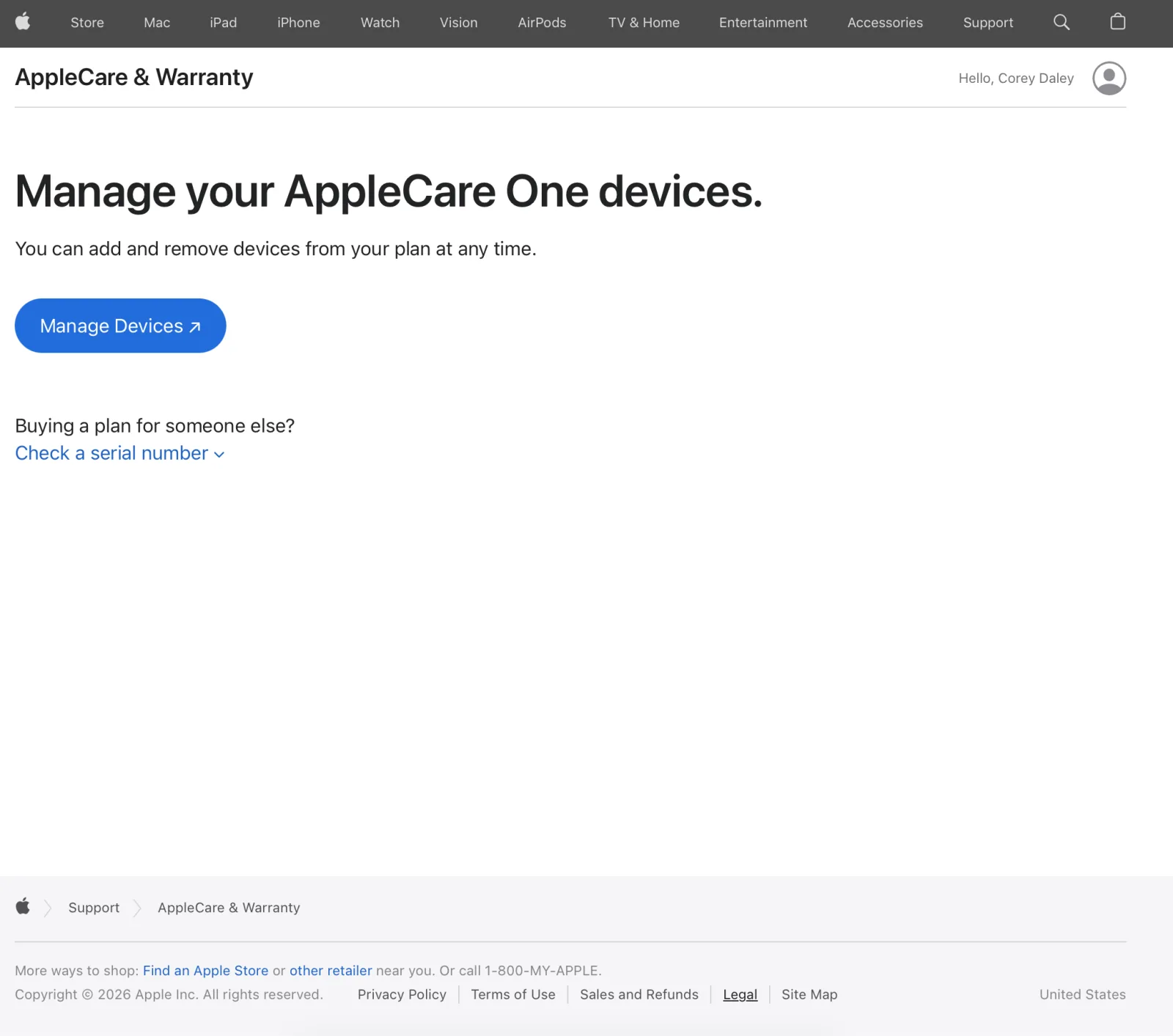
That’s it. That’s the thing thousands of forum posts are groping toward: a purpose-built, sign-in-with-your-own-account, pay-by-serial-number flow for insuring a device that isn’t yours — sitting behind a URL you’d never guess and a link you’d never scroll to.
A couple of practical notes. You still need the device’s serial number, and the usual AppleCare eligibility windows apply — coverage has to be purchased within the standard window after the device’s purchase, and some devices require a diagnostic or activation before they’ll register. If the device has never been turned on, you may hit the same activation requirement people run into everywhere else; that’s a hardware-eligibility rule, not a billing one. Once the purchase goes through, the coverage shows up against the device — the owner can confirm it anytime by punching the serial number into checkcoverage.apple.com — and there’s nothing the owner has to do on their end to “accept” it. For the common case — a device already in use, owned by someone whose finances you’d rather not entangle with yours — this is the clean path.
Why this is an industry story, not just a tip
I could have stopped at “here’s the URL, bookmark it.” But the reason I’m writing it down is the gap itself, because that gap is a design failure worth naming.
Apple did the hard part right. Someone on that team understood that the buyer of a service and the owner of a device are frequently different people, that conflating them creates a real safety problem, and that the correct fix is to decouple payment from the device entirely. They built it, and the feature is genuinely good.
Then they buried it so thoroughly that the people it was built for spend years not knowing it exists. And a feature you can’t find doesn’t exist — not to the user. Discoverability isn’t polish you add at the end; it’s part of whether the thing works at all. This is the quiet tax of large platforms: the capability ships, the surface area is so vast and the org chart so siloed that a real solution to a real problem ends up indistinguishable from one that was never built. The forums become the documentation, and the documentation is mostly wrong, because it’s a pile of workarounds for a wall that had a door in it all along.
So: agreementsales.apple.com/acsales/manage , sign in as yourself, “Buying a plan for someone else? Check a serial number.” Insure the hardware. Keep your card off their device. And maybe bookmark it, because you’ll want to send it to the next person who asks.
What other genuinely useful features are you using a workaround for right now — not because the real solution doesn’t exist, but because you’ve never been shown the door?