
coreydaley.dev

Purrchiver — open RAR, 7z, ZIP and more on your Mac

The clean Mac archive utility.

Open RAR, 7z, ZIP and more on your Mac.
No ads. No subscriptions. No tracking. Period.

Free forever to open and extract anything.
$9.99 once for the advanced tools. No trial, no subscription.

What Purrchiver does

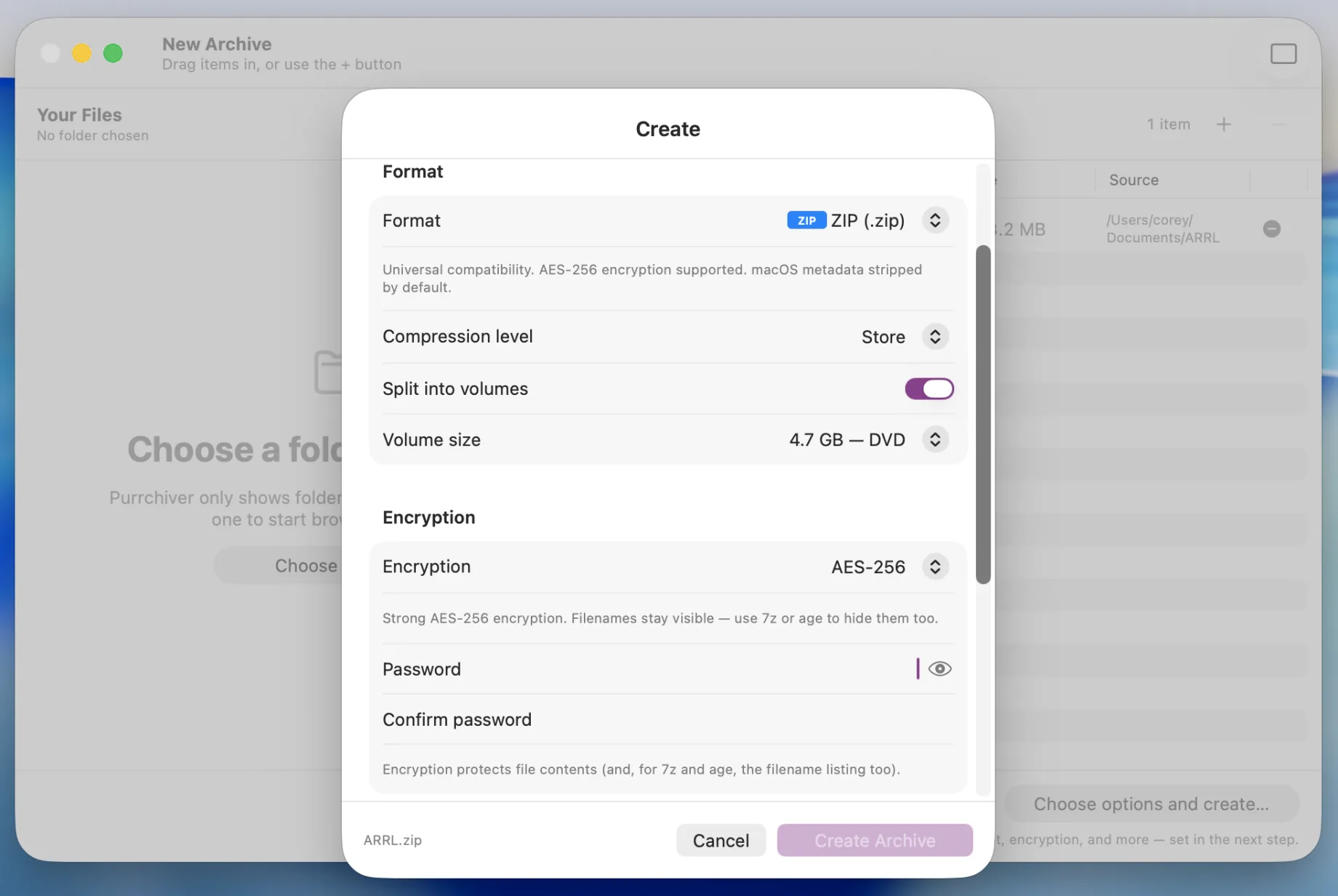
The Create Archive sheet with format, encryption, and split options

Create anything. Encrypt anything.

ZIP for everyone, 7z for the squeeze, tar for the server, AAR for Apple. Add AES-256, split it across volumes, strip the macOS cruft — all from one sheet with a live filename preview. Pick a format once and Purrchiver remembers it for next time.
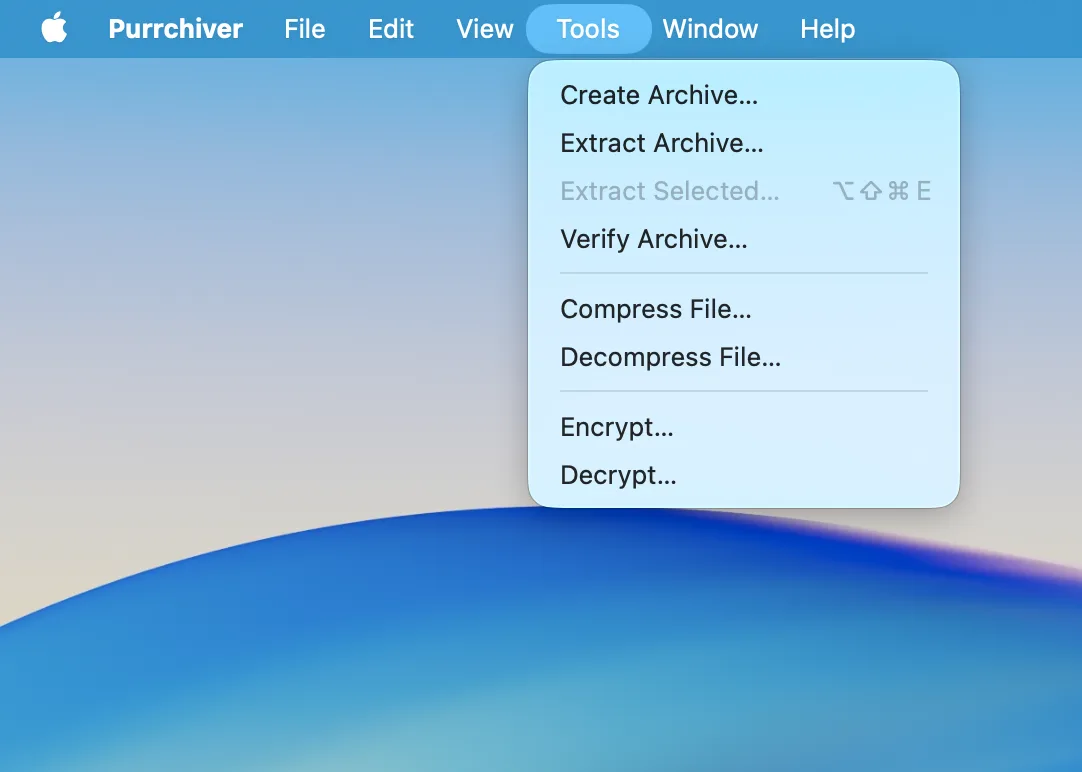
Purrchiver's Tools menu showing the Compress File, Decompress File, Encrypt, and Decrypt verbs

One file? One step.

Not everything needs a container. Compress a single file straight to gzip, xz, Zstandard, or Brotli — or wrap it in an encrypted age envelope — from the Tools menu, a Finder right-click, or a Shortcut. The inverse, Decompress and Decrypt, is one step too.

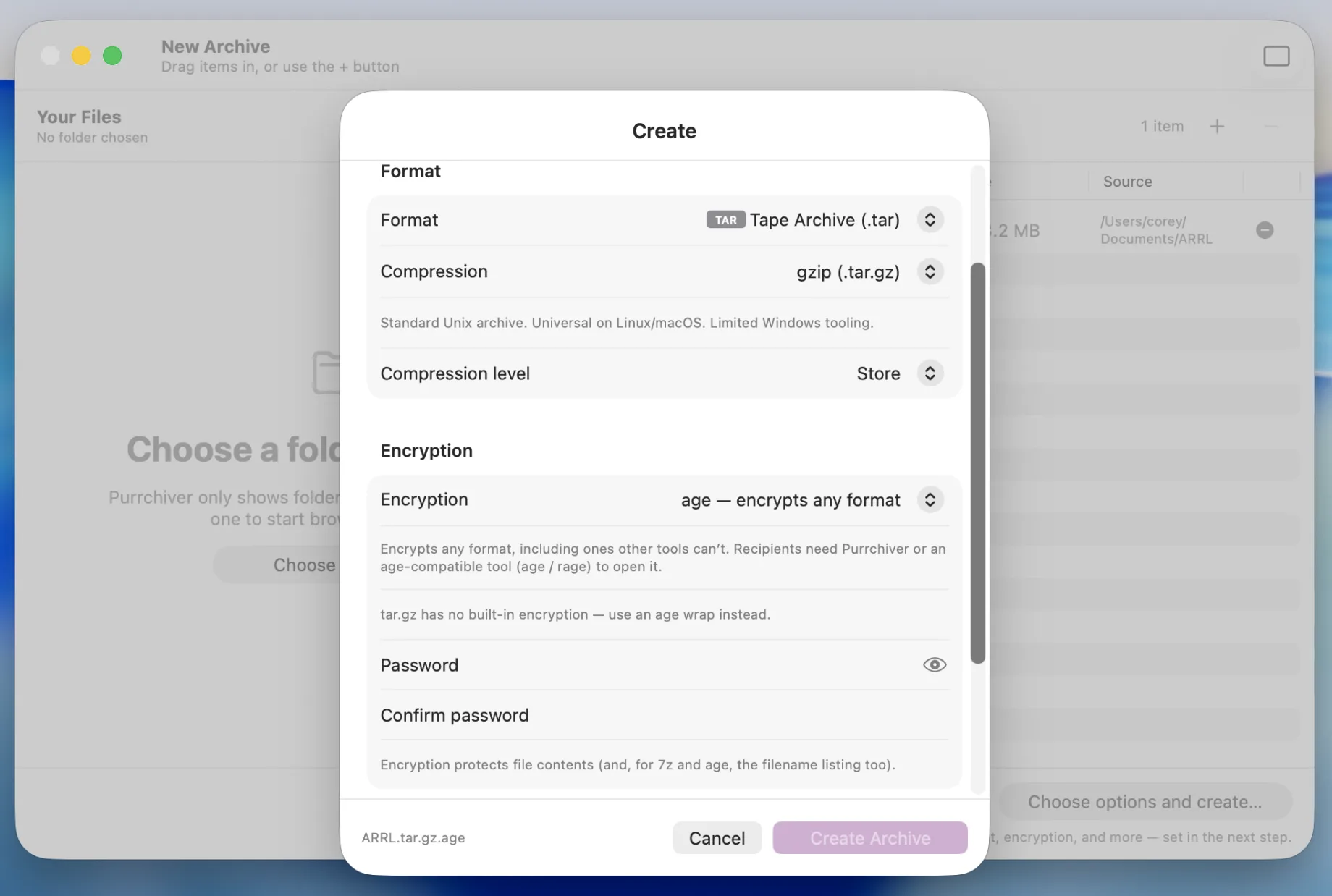
The Create sheet with age encryption selected for a .tar.gz, output .tar.gz.age

Encrypt what nothing else does.

Most Mac archivers can only encrypt a ZIP. Purrchiver wraps any container — a .tar.zst, an .iso, an Apple Archive, even a lone file — in a passphrase-based age envelope. Recipients open it with Purrchiver or any age-compatible tool.

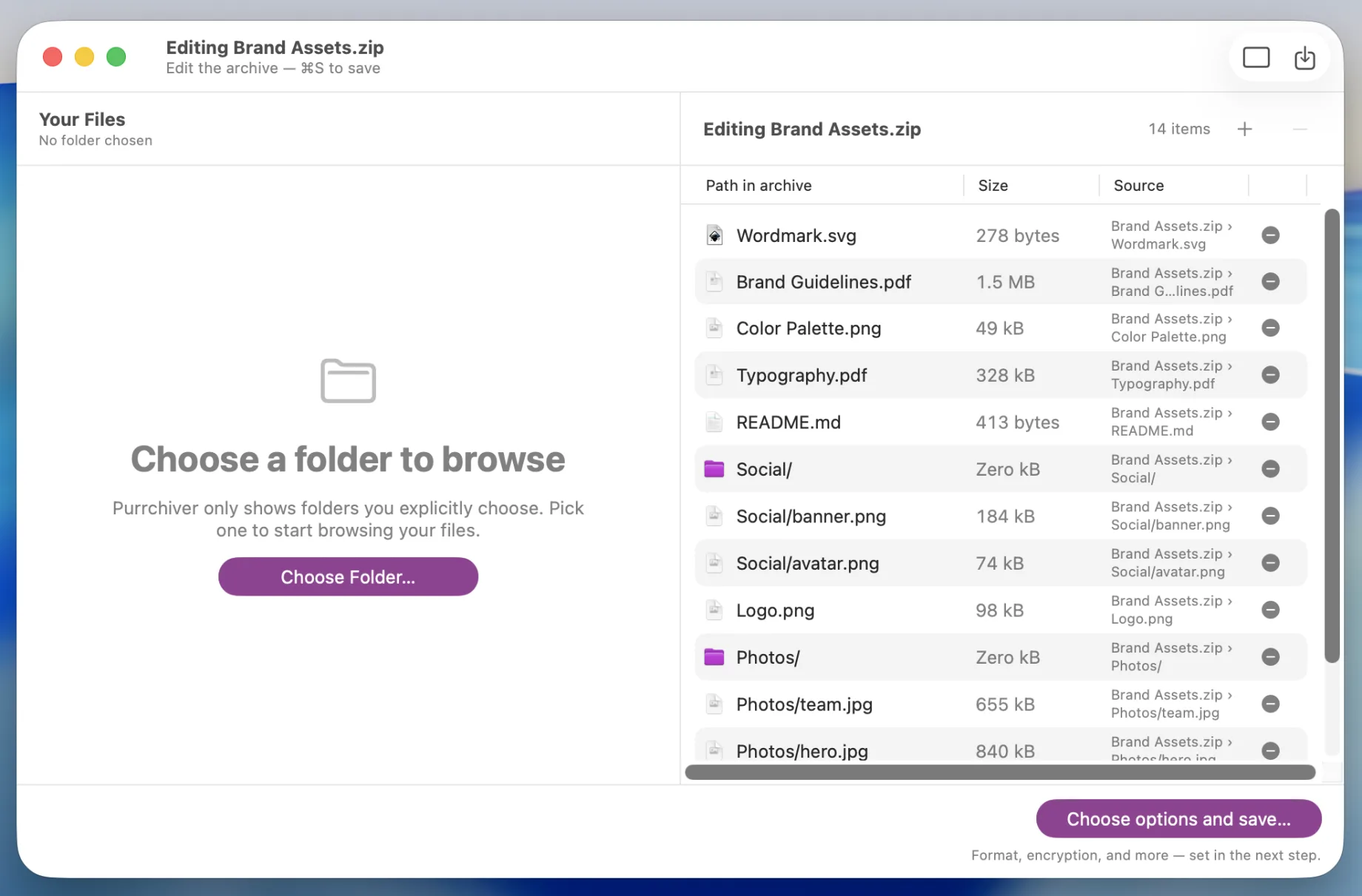
Purrchiver editing Brand Assets.zip in dual-pane Edit mode, entries with remove buttons

Edit archives in place.

Open an archive, drag in a file, remove an entry, save. No extract-the-whole-thing-and-rezip dance. Editing in place is part of the one-time unlock.

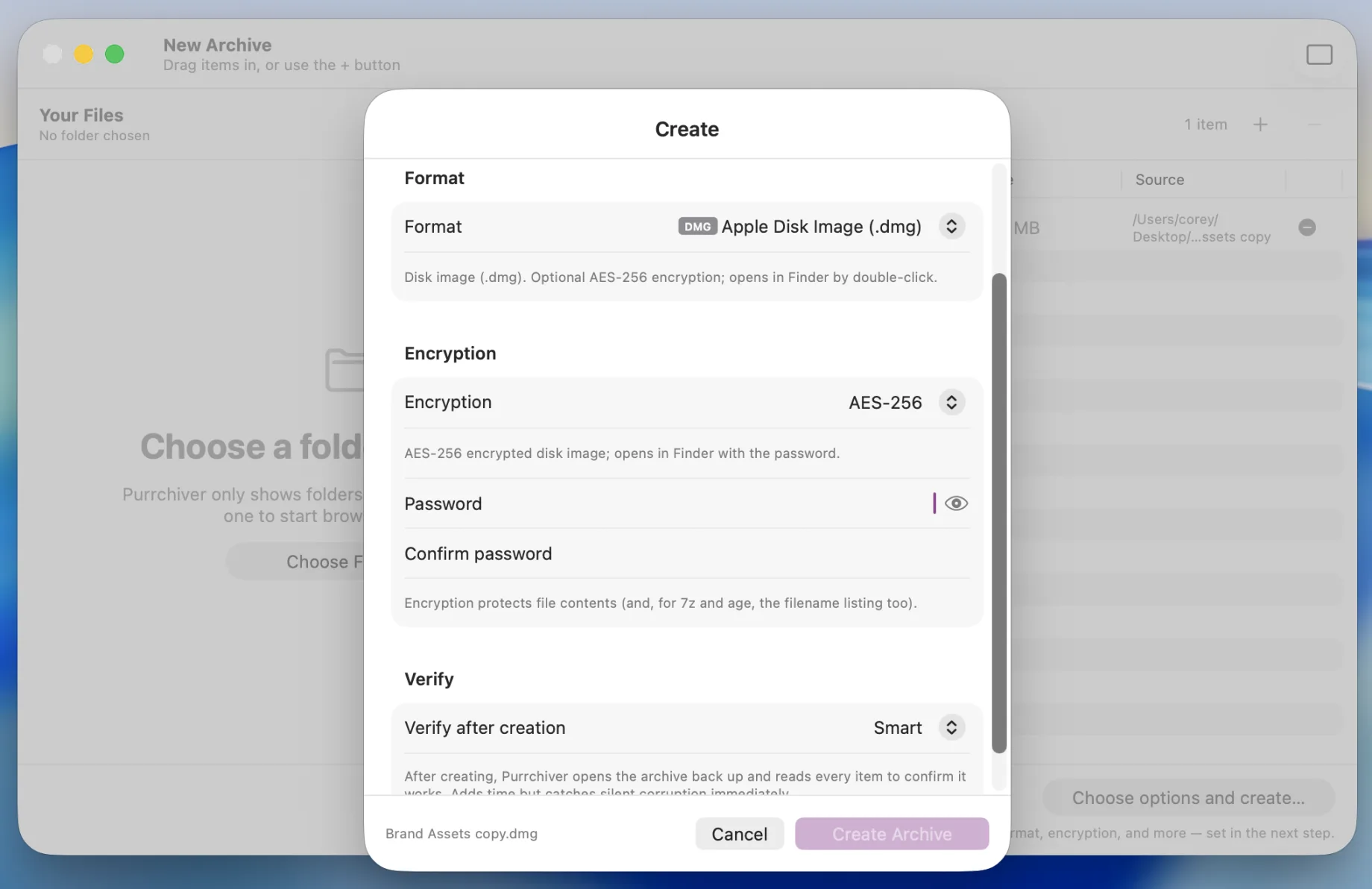
The Create sheet with Apple Disk Image (.dmg) selected and AES-256 encryption

Disk images, opened and built.

Drop a .dmg on Purrchiver and it lists the contents like any archive — pull out one file without mounting and ejecting a volume. Going the other way, create a plain or AES-256-encrypted disk image, built the sandbox-safe way through Apple’s own hdiutil.

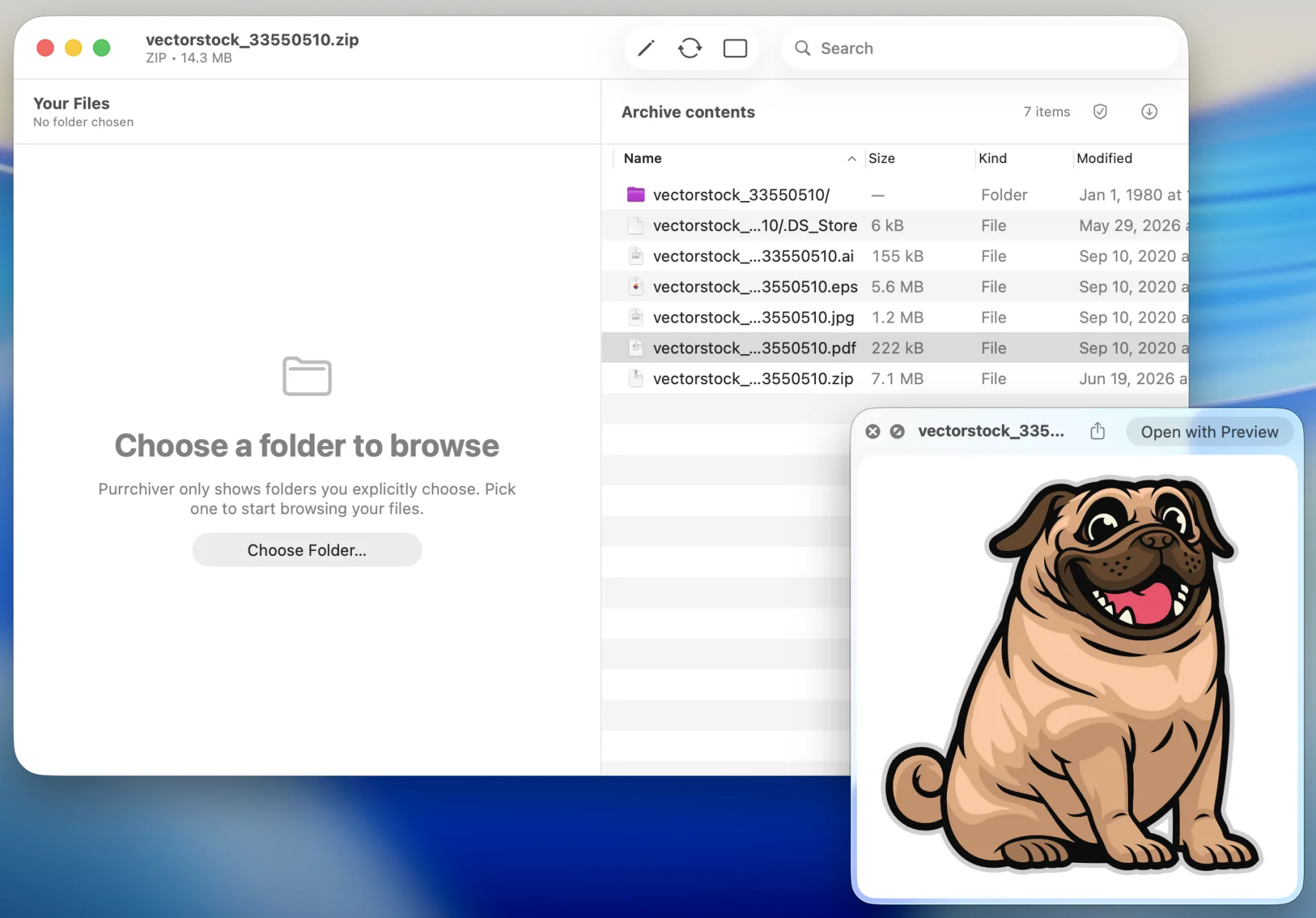
Quick Look rendering a file from inside an open archive

See inside before you extract.

Press Space on an archive in Finder to see what’s inside without launching anything. In Purrchiver, select a file and press Space and it renders through Quick Look: documents, images, PDFs, and more. Purrchiver pulls just that one item to show it; the rest of the archive stays packed.

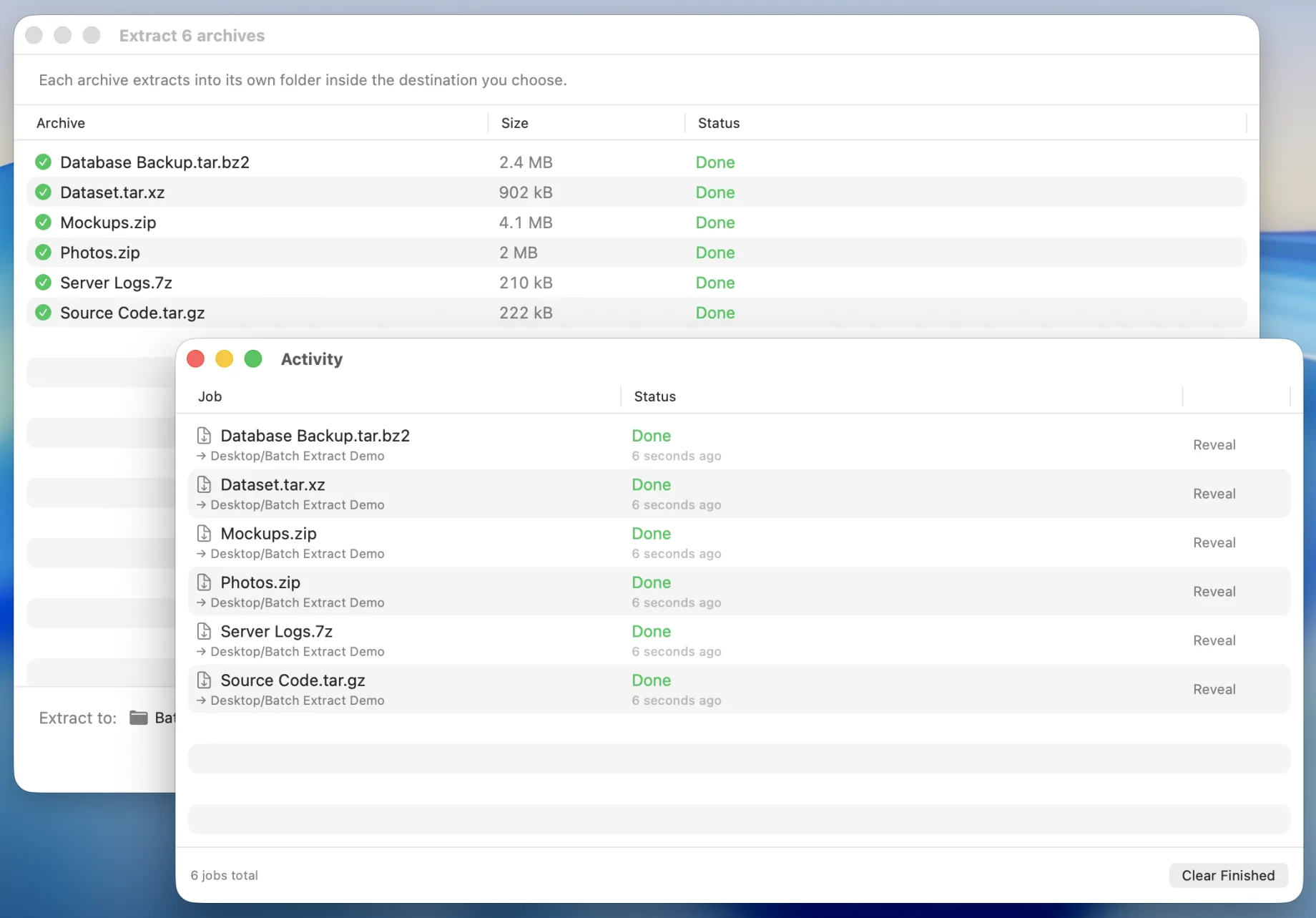
Purrchiver's Batch Extract window extracting six archives to one destination, all Done, with the Activity window

A whole pile at once.

Drop a stack of archives, pick one destination, and Purrchiver works through them with per-row progress. Big jobs run fire-and-forget — keep working while the queue drains in the Activity window. No one-at-a-time babysitting.

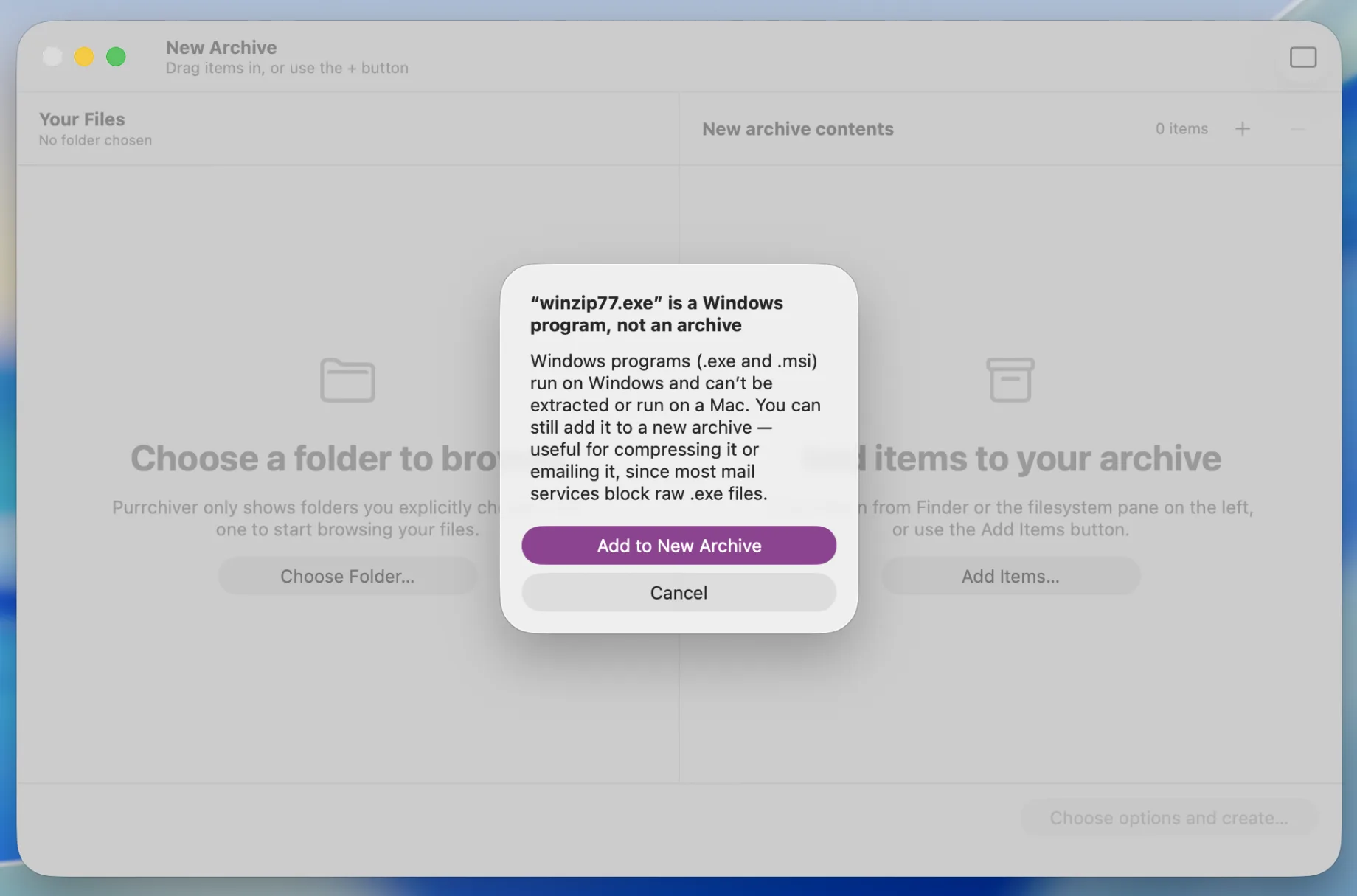
A friendly error explaining a .exe is a Windows program, not an archive, with an Add to New Archive option

When something's wrong, it says what.

Point Purrchiver at any one part of a split set — .part01.rar, .r00, .7z.001, .z01 — and it finds the rest and opens them as one archive; if a part is missing, it names the exact volume that’s gone. Windows installer instead of an archive? It says so. Wrong password? It tells you — never a blank “extraction failed.”

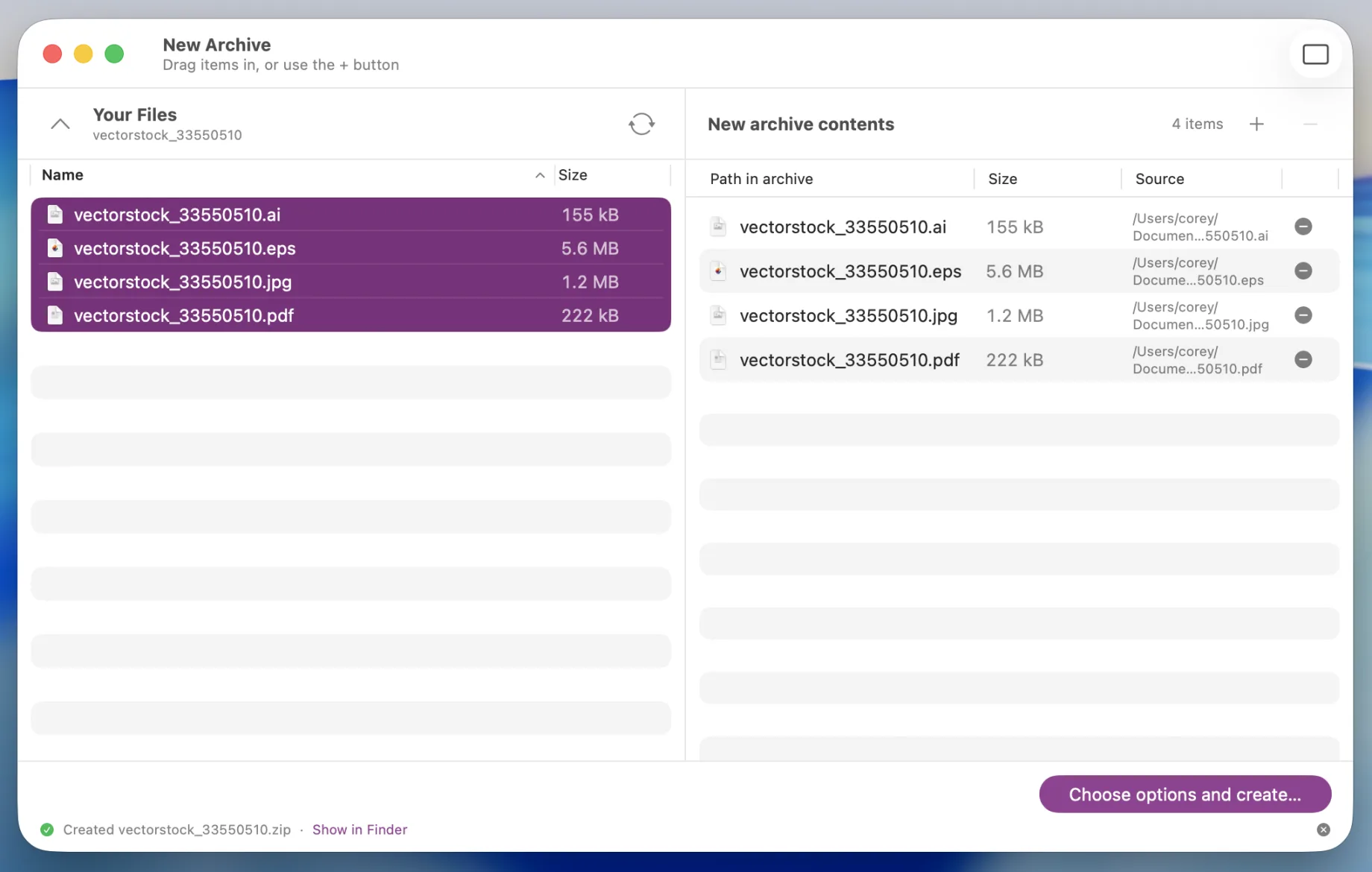
Purrchiver after a create finishes — a quiet inline 'Created …zip' confirmation in the footer, no popup or ad

When it's done, nothing happens.

No ad. No popup. No “rate this app.” When a compress finishes, a quiet inline “Created <file>” confirmation appears in the staging footer — and that’s the whole event.

Composable by design

Bundle, shrink, and lock — separately, or all at once.

Most archivers blur these into a single “make a zip” button. Purrchiver keeps them three distinct tools you can use on their own or stack in any order — so you build exactly the file you need, with the format and the lock that fit whoever’s receiving it.

  • Archive

    Bundle many files and folders into one container — ZIP, 7z, tar, Apple Archive, ISO, CPIO, even a DMG. Or skip compression entirely (plain tar, or None) when you just want one tidy file.

  • Compress

    Shrink it — inside an archive at the level you choose, or a single file on its own: gzip, xz, Zstandard, Brotli, and more. Trade speed for size, or don’t.

  • Encrypt

    Lock it — AES-256 for ZIP and 7z, Apple’s AEA, an encrypted DMG, or the universal age wrap that encrypts any container or file, even ones nothing else can.

  • tarjust bundle
  • report.csv → .gzjust shrink
  • secret → .agejust lock
  • tar + zstd + ageall three

How they compose →

Every archive you'll actually meet.

35+ formats read, 20+ create — grouped by where you encounter them.

create create needs the one-time unlock — what’s free →

Common

Common formats — read and create support
FormatReadCreate
ZIPYesYes
ZIP + AES-256YesYes — needs the one-time unlock
IPAiOS app bundle — editable in place (ZIP)YesNo
APKAndroid app bundle — editable in place (ZIP)YesNo
JAR / WAR / EARJava archives — read-onlyYesNo
ZipCrypto ZIPYesNo
RAR4YesNo
RAR5YesNo
Encrypted RARYesNo
.cryptoMacPaw Encrypto — decrypt + readYesNo
7zYesYes — needs the one-time unlock
7z + AES-256YesYes — needs the one-time unlock
tarYesYes
.tar.gzYesYes
.tar.bz2YesYes
.tar.xzYesYes — needs the one-time unlock
.tar.zstYesYes — needs the one-time unlock
.tar.lzYesYes — needs the one-time unlock
.tar.lz4YesYes — needs the one-time unlock
.tar.brBrotliYesYes — needs the one-time unlock
ISO 9660YesYes — needs the one-time unlock
DMGopen & extract like an archiveYesYes
DMG + AES-256YesYes — needs the one-time unlock

Multi-part / split-volume

Multi-part / split-volume formats — read and create support
FormatReadCreate
Multi-part RAR.partN.rar / .r00YesNo
Spanned ZIP.z01 / .z02YesNo
Split 7z.7z.001 — nativeYesYes — needs the one-time unlock
Split ZIP.zip.001 — byte-splitYesYes — needs the one-time unlock
Split tar.tar.gz.001 …YesYes — needs the one-time unlock

Apple ecosystem

Apple ecosystem formats — read and create support
FormatReadCreate
AARApple ArchiveYesYes
AEAApple Encrypted ArchiveYesYes — needs the one-time unlock
ageuniversal encryption wrapYesYes — needs the one-time unlock

Unix & Linux

Unix & Linux formats — read and create support
FormatReadCreate
CPIOYesYes — needs the one-time unlock
.debYesNo
.rpmYesNo
.astatic libraryYesNo
.lzlzipYesYes — needs the one-time unlock
.lz4YesYes — needs the one-time unlock

Legacy & archival

Legacy & archival formats — read and create support
FormatReadCreate
LHAYesNo
LZHYesNo
CABYesNo
WARCYesNo
.ZcompressYesNo

Compression streams

Compression streams formats — read and create support
FormatReadCreate
gzipYesYes
bzip2YesYes
xzYesYes — needs the one-time unlock
ZstandardYesYes — needs the one-time unlock
BrotliYesYes — needs the one-time unlock
LZMAYesYes — needs the one-time unlock

Plus, peek inside these signed Apple installer formats:

  • XIP
  • PKG
  • MPKG
  • XAR

Free rescue tools, for good

When an archive won't open, getting your files back is free.

Damaged, cut off, or just stubborn: everything Purrchiver does to get your files out is in the free tier, and it’s staying there. The one-time unlock is only for making and changing archives.

  • Recover what's readable. New in 1.1

    A cut-off download or a bad sector rarely ruins everything. Purrchiver keeps every file that’s intact and names anything only partly recovered “(incomplete)”, so you always know which is which.

  • Repair it to the exact original. New in 1.1

    When a .par2 file comes with the archive, Purrchiver rebuilds the damaged parts and keeps the repaired copy only if it matches the original byte for byte.

  • Open what Archive Utility won't.

    RAR and multi-part RAR sets, AES-encrypted ZIPs, .tar.zst: no .cpgz loop, and when something’s wrong, an error that says what.

  • Check it's the right file. New in 1.1

    The .sha256 file published beside a download is checked automatically when you extract everything, and so is one listing every file inside, like the ones Purrchiver writes. In Shortcuts, any file can be checked against a checksum you paste.

Archive won't open? Find your fix →

Speed

Fast where it counts.

Built on a multithreaded engine. At its default settings, Purrchiver matches or beats the standard command-line tools on most formats it writes — without trading away compression.

  • About 5×

    faster tar.xz than the built-in tar — 170 MB in 8 s, not 46 s (M2 Pro).

  • Multithreaded

    ZIP, 7z and tar.xz use every core, where the built-in tools mostly run single-threaded.

  • Same size

    matches the standard tools’ compression ratio format-for-format — the speed comes free.

See the full benchmarks →

Shortcuts & App Intents

Put archiving in your Shortcuts.

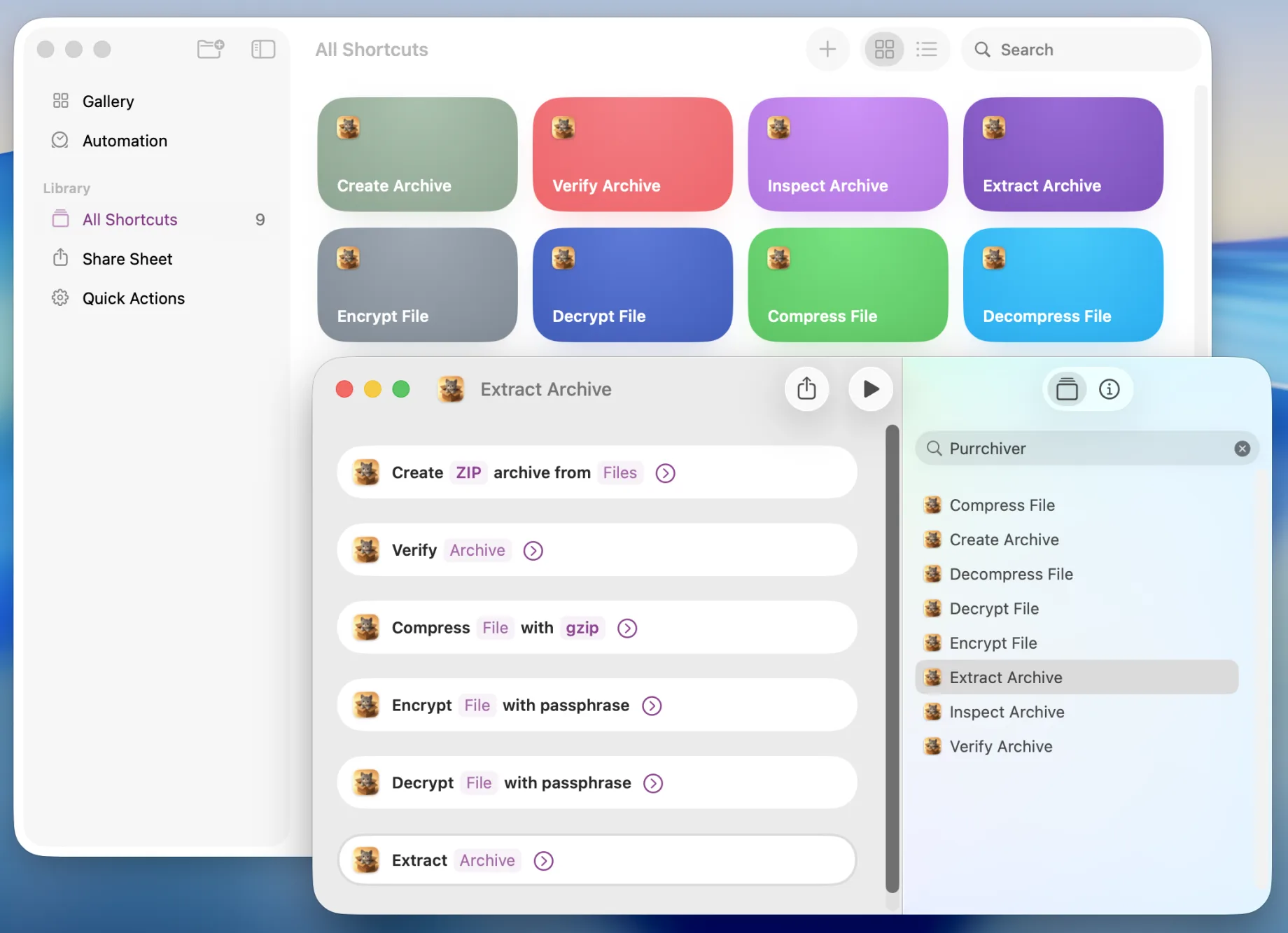
A full, symmetric set of actions built on App Intents — every “make” verb has its inverse, so they chain cleanly. Wire up a folder that auto-extracts anything dropped in it, or “compress this selection and attach it to an email.” They run in the Shortcuts app, by voice with Siri, and from Spotlight. No scripting. Automation is part of the one-time unlock.

Purrchiver's eight actions in Apple's Shortcuts app, with a shortcut chaining several of them
  • Create Archive

    Compress files into ZIP, 7z, and more — with an optional password for AES-256 encryption.

  • Extract Archive

    Unpack an archive to a folder, then hand the result to the next step.

  • Verify Archive

    Read every entry to confirm an archive is intact — a yes/no you can branch on.

  • Inspect Archive

    List an archive’s entries and metadata without extracting anything.

  • Compress File

    Compress a single file to gzip, xz, zstd, or Brotli — no container needed.

  • Decompress File

    Reverse a single-stream .gz / .xz / .zst / .br file back to the original.

  • Encrypt File

    Wrap any file in a passphrase-protected age envelope, ready to hand off.

  • Decrypt File

    Open an age-encrypted file back to the original, with the passphrase.

Security & privacy

An archive utility should be the boring one.

It opens your files and gets out of the way. Nothing else.

  • Sandboxed by design.

    App Sandbox is enabled. Purrchiver only sees files you explicitly grant access to — no system-wide read, no disk scanning.

  • Doesn't phone home.

    No analytics pings, no update checks, no crash uploads. The app has no network entitlement — even App Store receipt validation runs at the OS level, outside the app process.

  • The unlock stays on your Mac.

    The one-time unlock is verified locally against the App Store — no Purrchiver account, no login, no network call to check it. Buying the upgrade adds zero phone-home. age encryption is offline too: a passphrase wrap, no key servers.

  • AES-256, verified.

    Encrypted archives use AES-256 — the industry-standard algorithm, not a homegrown scheme. Every encrypted archive is verified after creation by default — a typo never locks you out.

  • No third-party analytics.

    SwiftUI, App Sandbox, Apple’s own frameworks for everything you can see. No Firebase, no Sentry, no Mixpanel — nothing else is along for the ride.

  • Crash reports stay local.

    Generated on your Mac. Nothing is sent anywhere unless you choose to email a report to the developer — and you can read it first.

  • Follows your Mac, not the reverse.

    Light/dark mode, accent color, Reduce Motion, Dynamic Type, tabs-vs-windows — all inherited from your system settings. No per-app theming to fight.

  • Usable without a mouse.

    Every common action has a keyboard shortcut, it’s built to work with VoiceOver, and every item carries Extract and Copy actions — so you never have to drag-and-drop to get files out.

Testing

Tested on the files that break things.

Every archive app opens a clean ZIP. Purrchiver’s tests go after the rest: Korean filenames, the 4 GiB line, RARs split into a dozen parts, and archives that are broken on purpose.

  • 1,800+

    automated tests, comparing extracted files with the originals byte for byte.

  • 14 tools

    including 7-Zip, tar and Apple’s aa, open Purrchiver’s archives, and Purrchiver opens theirs.

  • 150+

    deliberately broken archives from other projects. None may crash or hang it, and anything only partly recovered is marked.

How Purrchiver is tested →

Corey Daley

Built by Corey Daley

Made by one person. No team. No exit strategy.

I’m not an app farm. I’m not a marketing team. Email goes directly to me. If something’s broken, I’m the one who fixes it. If you have a feature request, I’m the one who reads it.

corey@coreydaley.dev

What's free and what the unlock adds

Free on the Mac App Store

A complete archive tool, free.

  • Open & extract every format — ZIP, RAR, 7z, tar, ISO, AAR, and more, including encrypted archives
  • Quick Look preview in Finder — see inside without opening the app
  • Test any archive’s integrity on demand
  • Recover damaged archives, and repair them from recovery data New in 1.1
  • Batch-extract a whole drop of archives to one destination
  • Create ZIP, AAR, tar, .tar.gz, .tar.bz2, .gz, .bz2, and plain DMG

Getting your files back is always free: opening, extracting, and testing, plus recovering and repairing from 1.1.

$9.99 · one-time

The one-time unlock adds

Unlock the advanced features once.

  • Create 7z, xz, zstd, Brotli, lzip, lz4, ISO, and CPIO
  • Encrypt anything — ZIP/7z AES-256, AEA, age-wrap, encrypted DMG
  • Split archives into numbered volumes
  • Edit archives in place — add and remove entries, then save
  • Batch create & encrypt
  • Write checksum files and recovery data beside new archives New in 1.1
  • Advanced Shortcuts actions: create advanced formats, encrypt, write checksums, add recovery data

One purchase. No subscription, no account, no upsells — verified locally on your Mac, so unlocking needs no network.

See the full free-vs-unlock breakdown →

Free forever to open anything. $9.99 once for the rest.

$9.99

  • Pay once for the advanced tools (what’s free →)
  • No trial, no subscription, no upsells
Download on the Mac App Store

How does Purrchiver compare? →