On-Device, Cloud, Cloud Pro or ChatGPT: which model to use in Shortcuts
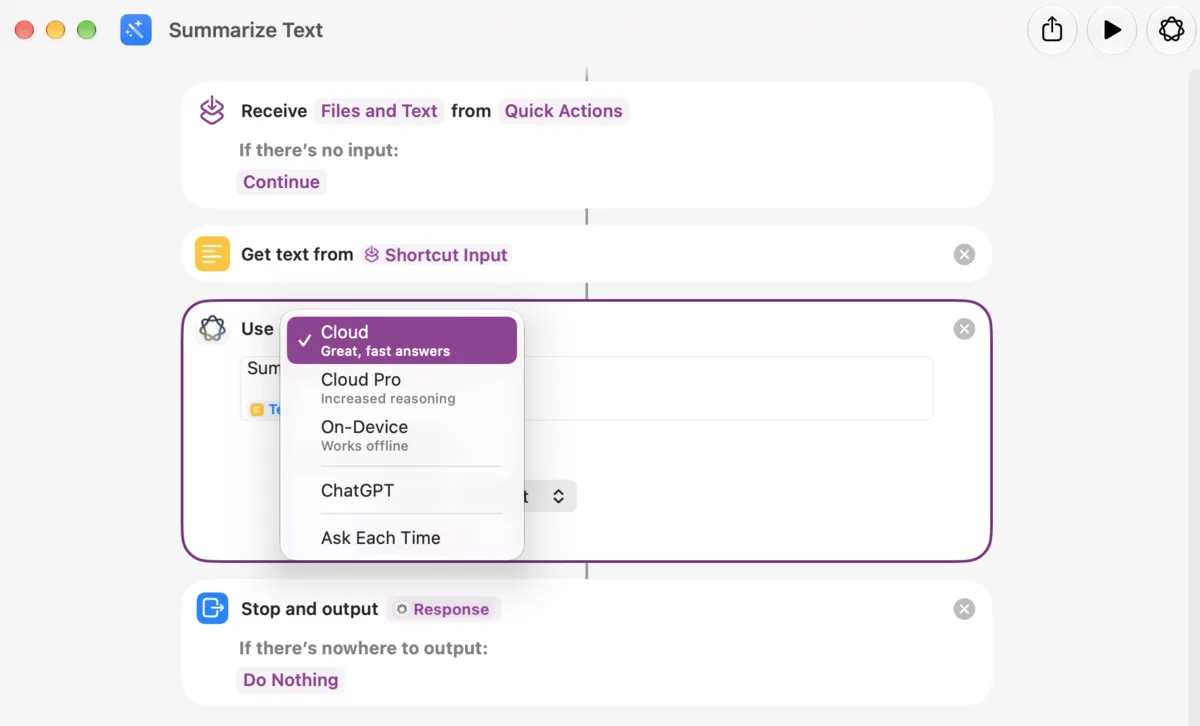
Use On-Device when the text must stay on your device or you’re offline, and the task is short and simple: rewording, a one-line summary, a yes/no question. Use Cloud for most everything else. Use Cloud Pro when the answer has to be right (dates, arithmetic, picking out who does what) or the input is very long. All three come with Apple Intelligence. ChatGPT is a fourth choice once you connect a ChatGPT account; it was as accurate as Cloud Pro in my tests, but it sends your text to OpenAI, was slower, and on very long input it quietly ignored the end.
I tested all four side by side on a Mac with an M2 Pro and 16 GB of memory,
running macOS 27.2, in October 2026, with ChatGPT connected through a paid
ChatGPT Plus account. Each test was a shortcut with three actions (Get Text
from Input, Use Model, Stop and Output), run from Terminal with
shortcuts run.
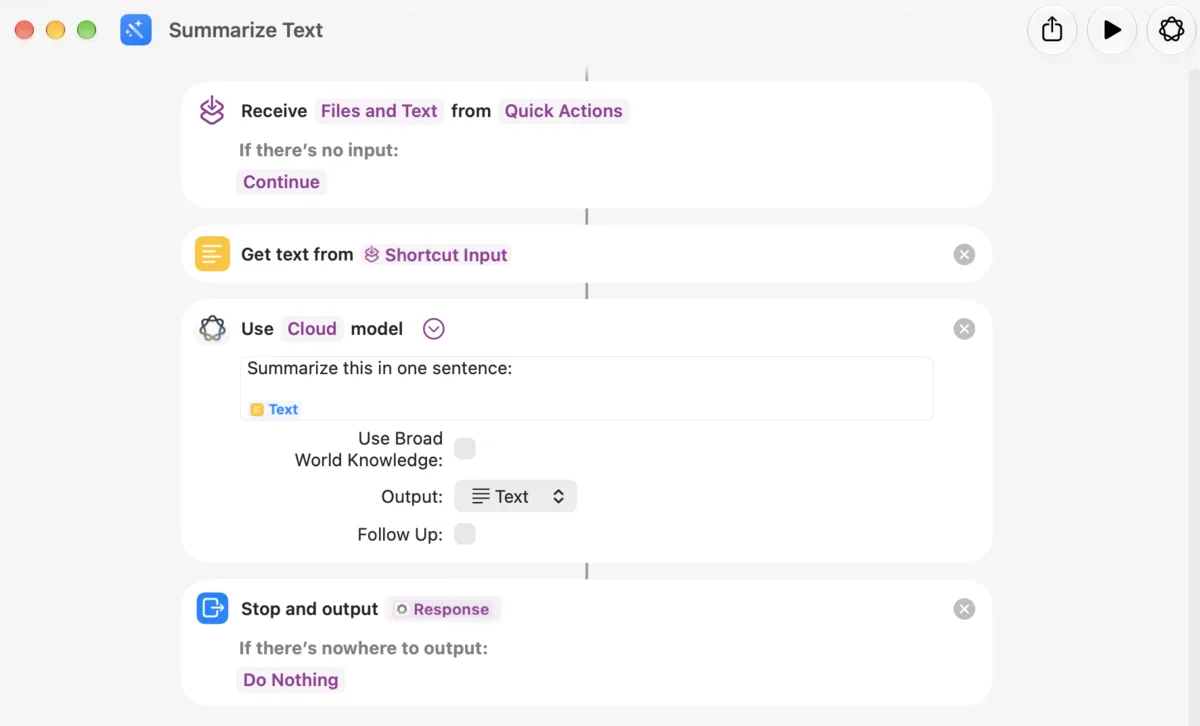
The choices in Use Model
| Model | Where it runs | What leaves your device | Good for |
|---|---|---|---|
| On-Device | Your Mac, iPhone or iPad | Nothing | Short, simple text tasks; offline |
| Cloud | Apple’s Private Cloud Compute | Your prompt and its inputs, to Apple’s servers | Most tasks |
| Cloud Pro | Private Cloud Compute | Same as Cloud | Reasoning, accuracy, very long input |
| ChatGPT | OpenAI | Your prompt and its inputs, to OpenAI | Accuracy, if sending to OpenAI is fine |
| Ask Each Time | Your pick at run time | Depends on the pick | Shortcuts you share |
Click the model’s name in the action to switch. The picker on macOS 27.2 describes them as “Works offline” (On-Device), “Great, fast answers” (Cloud) and “Increased reasoning” (Cloud Pro); ChatGPT is listed once it’s connected in System Settings > Apple Intelligence & Siri. Cloud Pro isn’t included with every iCloud plan; if yours doesn’t have it, the action stops with an error (see troubleshooting).
On-Device and Private Cloud Compute, briefly
Apple Intelligence runs in two places, and Use Model lets you pick.
On-Device is a smaller Apple model that runs on your Mac’s, iPhone’s or iPad’s own chip. It’s free, Shortcuts describes it as working without a network connection, and Apple’s usage limits apply to the server-based features, not to it. Being small, it’s the least capable of the three, as the tests below show.
Private Cloud Compute is Apple’s own server system for Apple Intelligence. Cloud and Cloud Pro are larger models that run there. Cloud runs on Apple silicon servers. For Cloud Pro, Apple extended Private Cloud Compute to NVIDIA GPUs in Google Cloud in 2026, still running only software Apple has approved; Apple said in June that the Google Cloud side would be “gradually ramping towards the complete set of protections” through the summer. Apple designed it so that, in its own words, your device sends data “for the sole, exclusive purpose of fulfilling the user’s inference request”, “no user data is retained in any form after the response is returned”, and the data is “never available to Apple — even to staff with administrative access.” Apple publishes the server software so independent researchers can check those claims. Apple’s Private Cloud Compute security write-up explains how.
The cloud models aren’t unlimited, though; see usage limits and iCloud+ below.
What leaves your device
On-Device keeps everything on the device: nothing in the prompt leaves. Keep Use Broad World Knowledge off in the action’s options too: Shortcuts describes it as letting the model “go out to the web for up-to-date information.”
Cloud and Cloud Pro send the prompt, including any variables you put in it, to Private Cloud Compute, with the protections above. You’re still sending the data off your device, so for something you wouldn’t put in an email, use On-Device.
ChatGPT sends the prompt, including its variables, to OpenAI, and OpenAI’s own policies for your account apply to it, not Apple’s Private Cloud Compute protections. Its action also has no Use Broad World Knowledge option; only Output and Follow Up.
Whatever you pick, the choice is per action. A shortcut can use On-Device for one step and Cloud for another.
Speed
On short requests Apple’s three models answered in about a second, and
ChatGPT in about a second and a half, measured as the time shortcuts run
took from start to finish:
| Request | On-Device | Cloud | Cloud Pro | ChatGPT |
|---|---|---|---|---|
| Rewrite one sentence (5 runs each) | 0.6 s (1.1 s the first time) | 0.8 s | 0.9 s | 1.3–1.7 s |
| Action items from a 130-word note | 2.3 s | 1.3 s | 1.3 s | not timed |
On-Device was quickest for tiny jobs once it was loaded, and slower than the cloud models once there was more to write. None of the differences matter for a shortcut you run by hand. One ChatGPT request out of about 30 hung for two minutes and then failed with “The workload timed out before completing”; the same request worked when I ran it again.
Accuracy
| Test | On-Device | Cloud | Cloud Pro | ChatGPT |
|---|---|---|---|---|
| “How many times does the letter r appear in ‘strawberry’?” | 3 ✓ | 3 ✓ | 3 ✓ | 3 ✓ |
| A train leaves at 9:40, the trip takes 2 h 35 min, it arrives 15 min late. When does it arrive? (3 runs) | 11:15 ✗ | 12:40 ✗ | 12:30 ✓ | 12:30 ✓ |
| List the action items, owners and due dates in a short meeting note (2 runs) | Gave one task to the wrong person, and listed a decision as a task | Listed a decision as a task with no owner | All correct | All correct |
Running a prompt again didn’t change whether the answer was right. Short answers came back word for word; longer ones changed wording a little, but a wrong answer stayed wrong. Rerunning won’t fix it; a better model or a clearer prompt will.
Cloud Pro and ChatGPT made no mistakes. For anything you’ll act on without checking, like dates, totals or who’s doing what, use one of them, or check the answer.
Getting structured output
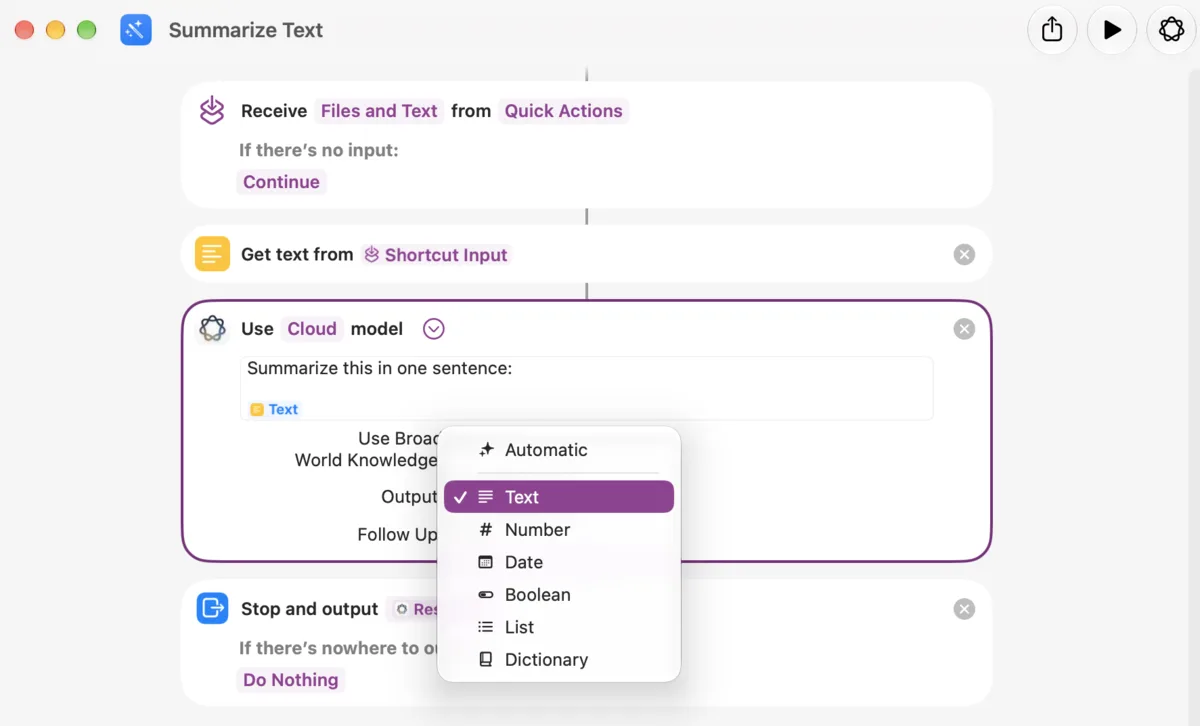
Use Model’s Output option can be Automatic, Text, Number, Boolean, List, Dictionary or Date, so later actions can use the pieces without parsing text. I asked On-Device, Cloud and ChatGPT to pull the store, date, total and item names out of a grocery receipt with Output set to Dictionary:
- Cloud returned a real dictionary each time, for example
{"store":"GREEN LEAF MARKET","date":"2026-10-24","total":12.84,"items":["Oat milk 1L","Sourdough loaf","Apples 1.2kg"]}. The key order and date format varied between runs. - On-Device returned text formatted as a bulleted list, three times out of three, with no error, and a JSON code block when I asked for JSON. Both are text, not a dictionary.
- ChatGPT did the same: three times out of three it returned a friendly bulleted list (“Here’s the extracted information from the receipt:”), with no error, instead of a dictionary.
I didn’t test Cloud Pro with Dictionary output. If a shortcut depends on it, use Cloud, and test it with your own input.
How much text it takes
Each model has a limit on how long the request can be. I sent each one a long run of short, plain English sentences and found where it stopped:
| Model | Worked at | Failed at |
|---|---|---|
| On-Device | 39,700 characters (about 6,900 words) | 41,600 characters |
| Cloud | 163,800 characters | 169,800 characters |
| Cloud Pro | 1,330,000 characters | 1,375,000 characters |
| ChatGPT | 1,015,000 characters, but see below | 1,063,750 characters |
On-Device and Cloud stopped with “The request exceeded the maximum allowed length.” Cloud Pro stopped with a vaguer “An error occurred when running the model.” ChatGPT’s error said it “failed to process the request: Unknown underlying error, this shouldn’t happen please file a radar.”
To check that the start and end of a long input weren’t being cut off, I put one sentence about a lighthouse at the start, and then at the end, of a text just under each model’s limit, and asked about it. Apple’s three models answered correctly both times.
ChatGPT didn’t. It found the sentence at the start of a million characters, but when the sentence was at the end it answered “Unknown.” It found it at the end of 600,000 characters and missed it at 700,000, 800,000, 900,000 and 1,000,000, each time with no error. So past roughly 600,000 characters of this text, ChatGPT accepts the request and answers without having read all of it.
The limit is counted in tokens, not characters, so your own text will fit more or less than this; dense text, code or other languages use more tokens per character. As a rule of thumb, On-Device handles a long email or a short article, Cloud a long report, and Cloud Pro a book. For ChatGPT, keep well under the point where it starts ignoring the end.
Usage limits and iCloud+
Apple lists the Cloud and Cloud Pro models in Shortcuts among the Apple Intelligence features with usage limits, in its support article Learn about Apple Intelligence usage limits. Apple doesn’t publish the numbers. It says limits vary by feature, how complex the request is and how busy the system is, and that when you reach one, the feature comes back after a time-out period.
A paid iCloud+ plan gets you more. Apple said in June 2026 that “increased access is available with most iCloud+ subscription plans”, and the support article adds that more access “will be available for a fee.” For apps that use Private Cloud Compute, Apple’s developer session says requests are “counted with your user’s iCloud account” and that users “can upgrade to iCloud+ to get higher limits”; Apple hasn’t said in as many words that Shortcuts counts the same way. Cloud Pro may not be available at all on some plans: Shortcuts has a separate error for when your iCloud plan doesn’t include it.
On-Device has no usage limit, which is one more reason to use it for small, frequent jobs, like a shortcut that runs on every file you download.
ChatGPT runs on your ChatGPT account, so OpenAI’s limits for that account apply rather than Apple’s; I didn’t hit one in about 30 requests.
In my own testing I sent about 50 Cloud and Cloud Pro requests in one session and none were turned away, and none of Use Model’s error messages on macOS 27.2 mentions a usage limit, so I can’t tell you what hitting one looks like in Shortcuts.
Which to pick
- The text is private, or you’re offline: On-Device. Keep the request short and check the answer.
- Small jobs that run often: On-Device, since it has no usage limit.
- Rewording, summaries, tagging, quick questions: Cloud.
- Dates, numbers, extraction you’ll act on, very long input: Cloud Pro.
- You already use ChatGPT and don’t mind OpenAI seeing the text: ChatGPT is as accurate as Cloud Pro here, but slower, and don’t give it very long input.
- A shortcut you’ll share: Ask Each Time, so each person makes their own privacy call.
Related
Ask Apple Intelligence about an archive: a worked example that feeds a file list from Purrchiver into Use Model