Designing App Store screenshots that don't need updating every release
On October 25 I finished nine new App Store screenshots for Purrchiver 1.1 and wrote “evergreen” in the commit message. On October 27, App Review rejected them.
Screenshots carry over between versions, so a release doesn’t need new ones. A set should be able to last many releases if you remove the things that date it. I haven’t had the releases to prove that yet, and I hadn’t found all of those things.
Letting Claude Code make my App Store screenshots covers how the set was built and exported. This post is about the design.
What dated the June set
The set I replaced was from June. Looking back in October, these stood out:
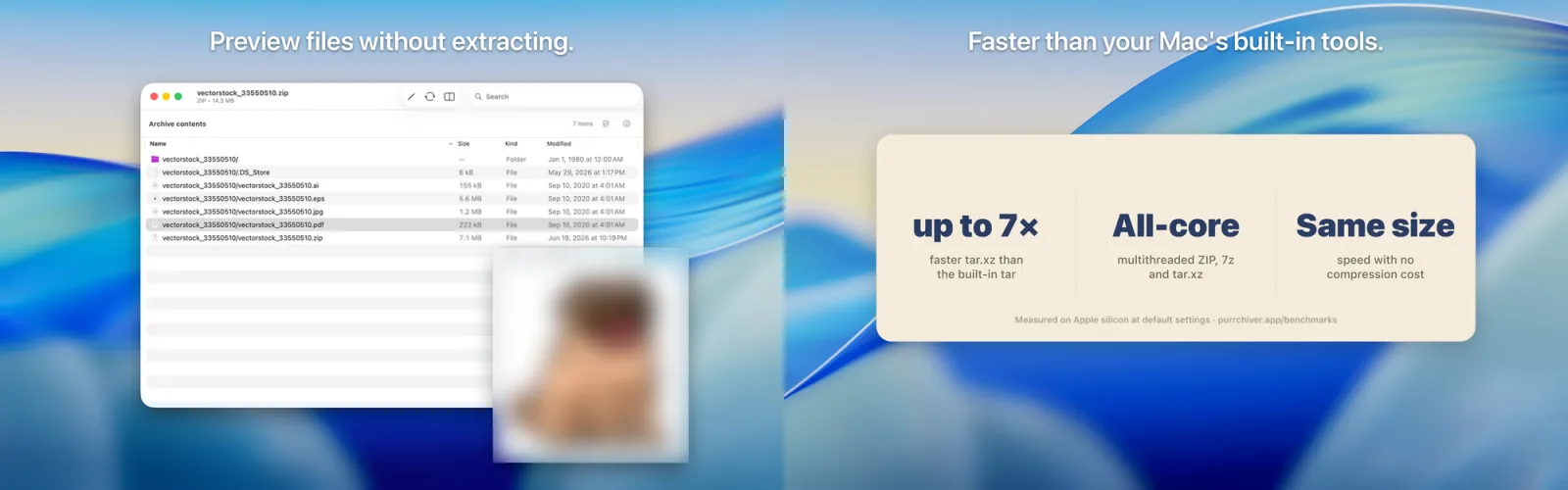
- A number. “Up to 7×” was true when I measured it: 8 seconds against 57
for the built-in
tar. By September the built-intartook 46 seconds, and the claim was about 5×. Purrchiver hadn’t changed. A claim relative to Apple’s tools can go stale without me touching anything. - An address. The same panel printed
purrchiver.app/benchmarks. It still redirects, but those pages have moved to this site. - File names. One panel showed a stock-site download, all
vectorstock_…, previewing a cartoon pug. That was wrong from day one, not just dated. (I’ve blurred the pug here; it isn’t mine to republish.) - Real dates. The file lists showed June 2026 on most panels, and 1980 to 2026 on the pug one.
None of those are about the app changing. I could have chosen not to print any of them.
The rules
The written spec Claude and I keep for the listing has rules meant to remove reasons to redo a panel:
- No numbers that drift. No format counts, test counts, speed multipliers, prices, version numbers or years. The speed panel now says “Every core” and “Light on memory”.
- Core features only. New features go in What’s New and the promotional text.
- Neutral demo data. One generated set of files for a made-up brand, with one fixed timestamp, in every capture.
- Keep the app in most panels. App Review expects to see it, so five of the nine show real captures. The four drawn cards have no window chrome to date, which I count as a bonus.
I also didn’t make an app preview video: footage goes stale with every UI change.
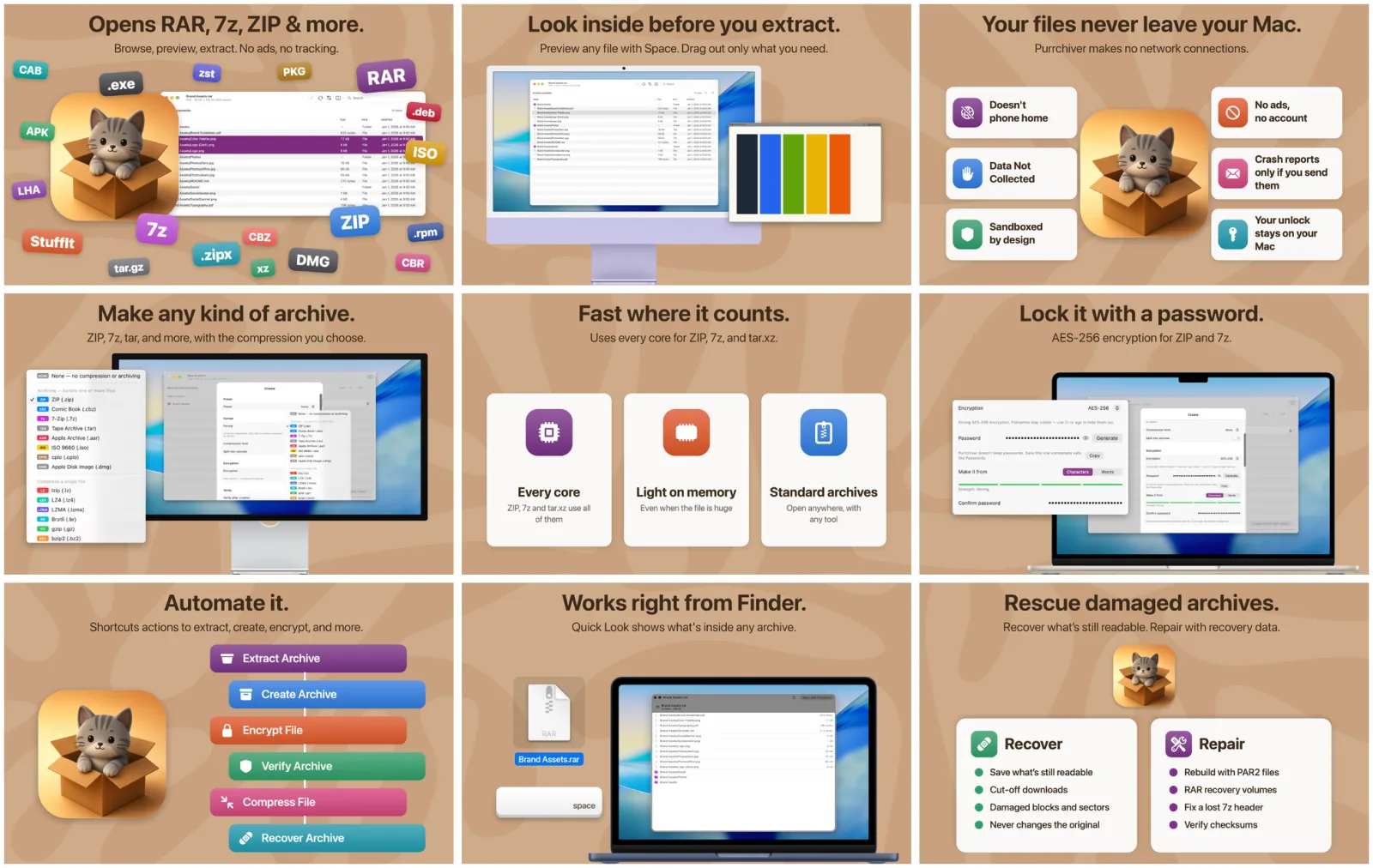
The spec itself says macOS restyles window chrome most years. So the capture panels have a shelf life, and “many releases” may mean one or two versions of macOS.
Decide in advance what forces a refresh
If I could keep only one rule, it would be this one. Refresh a panel only when:
- A feature it shows is removed or renamed.
- macOS changes the look of what’s in view enough that it looks dated.
- The brand changes: icon, colors or name.
- A caption stops being true.
These don’t count: a new version number, new formats, new features, a price change, or a macOS release that doesn’t change what’s on screen.
Without that list, every release ends with me staring at the screenshots and wondering. With it, the answer should usually be no, without a debate. The only thing that has forced a redo so far isn’t on the list: App Review.
Keeping a refresh small
In my working file, each panel is a group with the same layer names: Screen, Device, usually Popout, Headline and Subhead. The Macs differ, so Screen isn’t the same size or in the same place on each panel. The text is, so it lines up as you flip through the set. A refresh should mean composing a new capture and replacing one layer, though I haven’t had to do it yet.
The background runs across the panels instead of being tiled per panel: five very large shapes from Pixelmator Pro’s library, on one 25,920-pixel canvas, on a flat tan base. They cross the panel edges, so each panel gets a different crop and the set still looks like one thing.

It’s also easy to change. On a copy, in Pixelmator Pro 3.8 on macOS 27.2, I had a script change the fill on the five shapes, and the whole pattern changed with it. That’s what’s pictured. Hiding them left the flat base.
Blank templates
I’ve made blank Pixelmator Pro templates for Mac, iPhone, iPhone Duo, iPad and Apple Watch, free to use under CC0. Each has nine export slices at Apple’s exact size, an empty group for each panel and a Background group.
They have no artwork. The shapes in mine come from Pixelmator Pro’s library, and the Macs from Apple, so neither is mine to give away.
What I got wrong
“Free” is a price. My rules banned prices as numbers that drift, and the same spec named “free plus unlock” as a core feature. So panel 1 said “Opens RAR, 7z, ZIP & more. Free.” and panel 9 compared free with the unlock. App Review rejected 1.1.0 under Guideline 2.3.7, treating references to free services as price references. Those panels would never have gone stale. Rules for not dating say nothing about what App Review will accept.
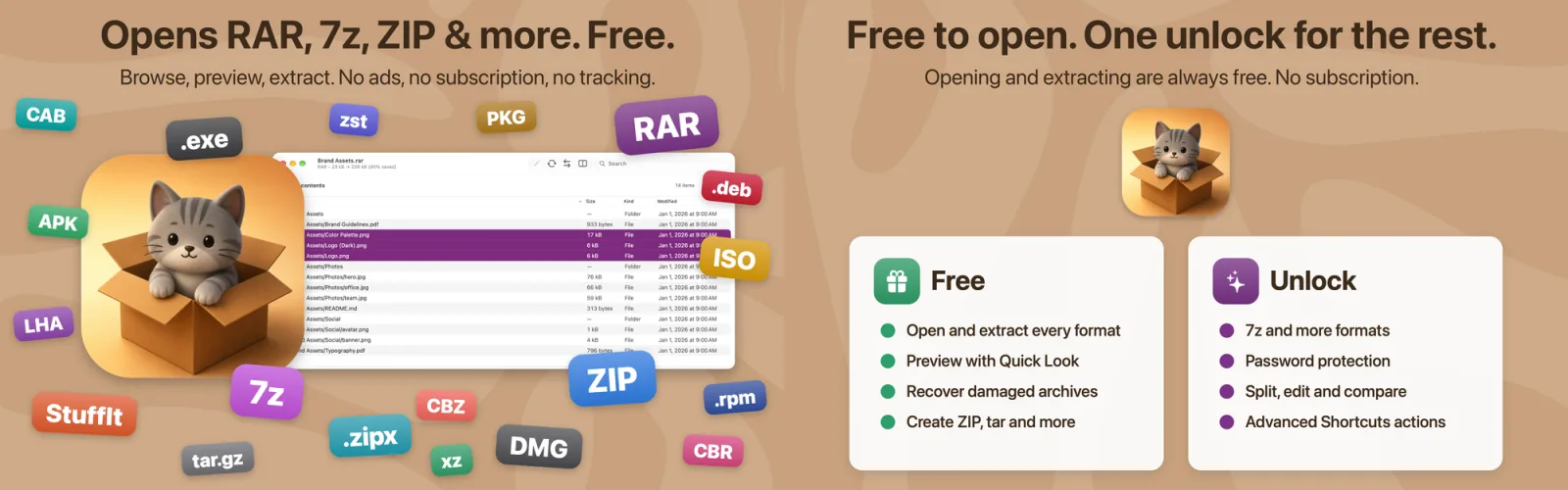
So the evergreen set needed two panels fixed before it ever shipped. The rule now reads “no price references at all, not even ‘free’”.
I broke “core features only” the same day. The new panel 9 advertises recovering damaged archives, which is new in 1.1. The spec’s list of core features simply gained “recovery”. It may be the right call, since it’s a good reason to get the app, but I changed the rule to fit the panel.
I still have a year on screen. The rules ban years, and the demo files’ fixed timestamp is January 1, 2026, right there in the Modified column. It keeps the date from changing when I recapture a panel, but it won’t look current forever. The real fix is cropping that column out, which I haven’t done.
“Up to 7×” was also a stronger claim than “Every core”. I’d make that trade again, but it is a trade. And the set only went live with 1.1 on October 29, so “lasts many releases” is still a plan. Ask me after macOS 28.
What’s the thing in your App Store screenshots most likely to look dated in a year?