
Feature workflow
The feature workflow is the end-to-end lifecycle for capturing, planning and building work. A feature is a GitHub issue with the type/feature label whose body is the spec, grounded in the repo’s README. There’s no PRD, milestone or wiki page. Three skills compose, and they hand off through GitHub artifacts rather than calling each other:
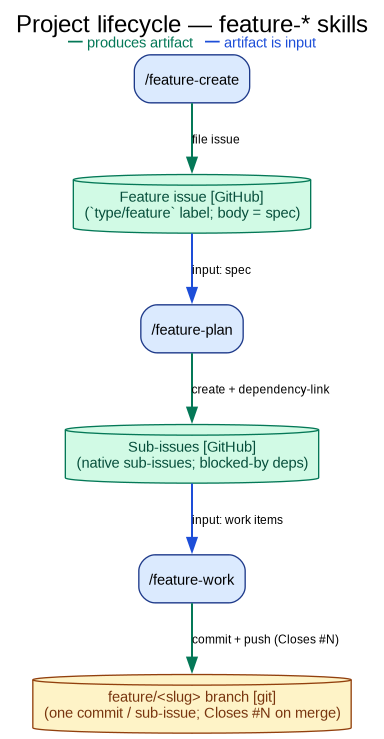
/feature-create: capture the spec
/feature-create turns a rough idea (optionally passed as a one-line argument) into a filed feature issue in the current repo. It explores and structures in one pass, one dimension at a time, scaled by size:
- Small: intent plus acceptance criteria.
- Large or epic: requirements and acceptance criteria, edge cases and error states, constraints (with security and privacy flagged), dependencies and assumptions, feasibility, scope creep, and open questions.
For a large feature, one fresh, independent sub-agent grades the drafted spec (Ready, Needs revision or Not ready) before you file it. The skill makes sure the type/feature label exists, self-assigns the issue, optionally adds a priority/* label, and then prints the next step without running it. It never creates a milestone or wiki page, writes a repo file, or runs git.
/feature-plan: break it into sub-issues
Point /feature-plan at a feature issue (a URL, <owner>/<repo>#N, or #N in the current repo) and it reads the issue body as the spec. Planning uses strict orchestrator/worker separation: drafts, critiques and reviews are delegated to fresh Claude sub-agents, so no context judges its own output. Independent drafts are critiqued and merged, then reviewed through lenses such as a devil’s advocate and a security review.
After one approval gate showing the proposed task breakdown, it:
- Creates one self-assigned sub-issue per task, each with Context, Implementation and Success Criteria sections plus priority and domain labels.
- Attaches each one as a native GitHub sub-issue of the feature.
- Encodes task ordering as native blocked-by dependencies.
The sub-issue hierarchy (with the parent’s progress bar) and the dependency links are the durable plan; the detailed rationale stays in a local, disposable PLAN.md. It’s one-shot: if the feature already has sub-issues, it stops.
/feature-work: build it on a branch
/feature-work takes the same feature issue and walks its sub-issues in dependency order. For each repo involved, it cuts (or finds) a feature/<slug> branch off the default branch in an isolated worktree, then for each sub-issue:
- implements it and runs targeted tests,
- checks the success criteria,
- makes one commit per sub-issue with a
Closes #Ntrailer, and pushes it to the feature branch.
It runs to the end of the list. A failing sub-issue is recorded and skipped rather than halting the run. Work it shouldn’t do on its own (subjective or visual calls, on-device testing, secrets, App Store steps, real judgment calls) is deferred to a punch list at the end for you to finish together.
Re-running resumes automatically: a sub-issue whose Closes #N commit is already on the branch counts as done. There’s no flag and no stored cursor.
What it won’t do:
- Merge. You merge the branch yourself, which fires each
Closes #Nand closes the sub-issues; then you close the feature. - Commit to the default branch, open a pull request, or force-push. A rejected push is yours to reconcile.
- Close sub-issues or create labels that don’t already exist.
Where audits fit
Audit reports are reference documents. To act on findings, capture them as a feature with /feature-create (or fold them into an existing feature issue), then run /feature-plan and /feature-work. Standalone bugs and chores go through /issue-create instead, which files a single issue with no sub-issues.