
Repair a damaged or corrupt ZIP on a Mac
New in Purrchiver 1.1. If you don't see it, update Purrchiver from the App Store.
An archive won’t open. macOS says it’s damaged, or “unable to expand”, or nothing happens at all. Most of the time the archive isn’t destroyed — part of it is, and everything else is still sitting there, readable.
This page covers what’s usually wrong, what can be recovered, and what can’t. Purrchiver’s recovery and repair tools are free, and they’re staying free: getting your files back is never part of the unlock. They also never change the damaged file: everything recovered or repaired is saved as a new copy, so trying them can’t make things worse.
The quick answer
- If there’s a
.par2file with it, you can probably get the exact original back. That’s recovery data — see below. A multi-part RAR’s.revfiles work the same way. - Get a fresh copy if you can. Re-download it, re-copy it from the original drive, or ask the sender again. Nothing beats an undamaged copy.
- If you can’t, recover what’s readable. Purrchiver does this for free: open the archive, and when it fails, choose Recover What’s Readable… (or use Tools → Recover Damaged Archive…).
- Look at what came back. Whole files keep their names. Anything only
partly recovered is saved as
name (incomplete).ext, so you always know which is which.
Get Purrchiver on the Mac App Store →
If it came with a .par2 file
A .par2 file beside the archive — Photos.par2, Photos.zip.par2, maybe
some ….vol00+10.par2 files — is recovery data: extra information that
can rebuild damaged parts of the archive exactly. With it, a damaged archive
isn’t salvaged, it’s repaired, byte for byte.
Purrchiver does this for free: open the archive and choose Repair Using Recovery Data…. It saves a repaired copy and only keeps it if it matches the original’s checksum. It works as long as no more of the archive is damaged than the recovery data covers — 10% recovery data, about 10% damage.
A multi-part RAR often comes with .rev files instead: RAR’s own
recovery volumes. Purrchiver can rebuild a missing or damaged part of
the set from them (RAR5 ones; WinRAR is needed for the older RAR 4 kind),
into a new “(repaired)” folder, without changing the original set. See
RAR recovery volumes.
What usually went wrong
- The download stopped early. The most common case by far. The archive is complete up to some point and then simply ends.
- The index at the end is damaged. A ZIP keeps a table of contents (the “central directory”) at its end. If that part is damaged, opening the archive normally fails, and many tools refuse it outright — even when every file inside is intact.
- Some bytes in the middle changed. A failing drive, a bad transfer. One file is damaged; the rest are usually fine.
- The drive can’t read part of it. Finder’s “error code -36”. Purrchiver reads past the unreadable spots and recovers everything else; get what you need off that drive soon.
- A part of a multi-part set is missing. Every file stored wholly in the parts you have can still come out.
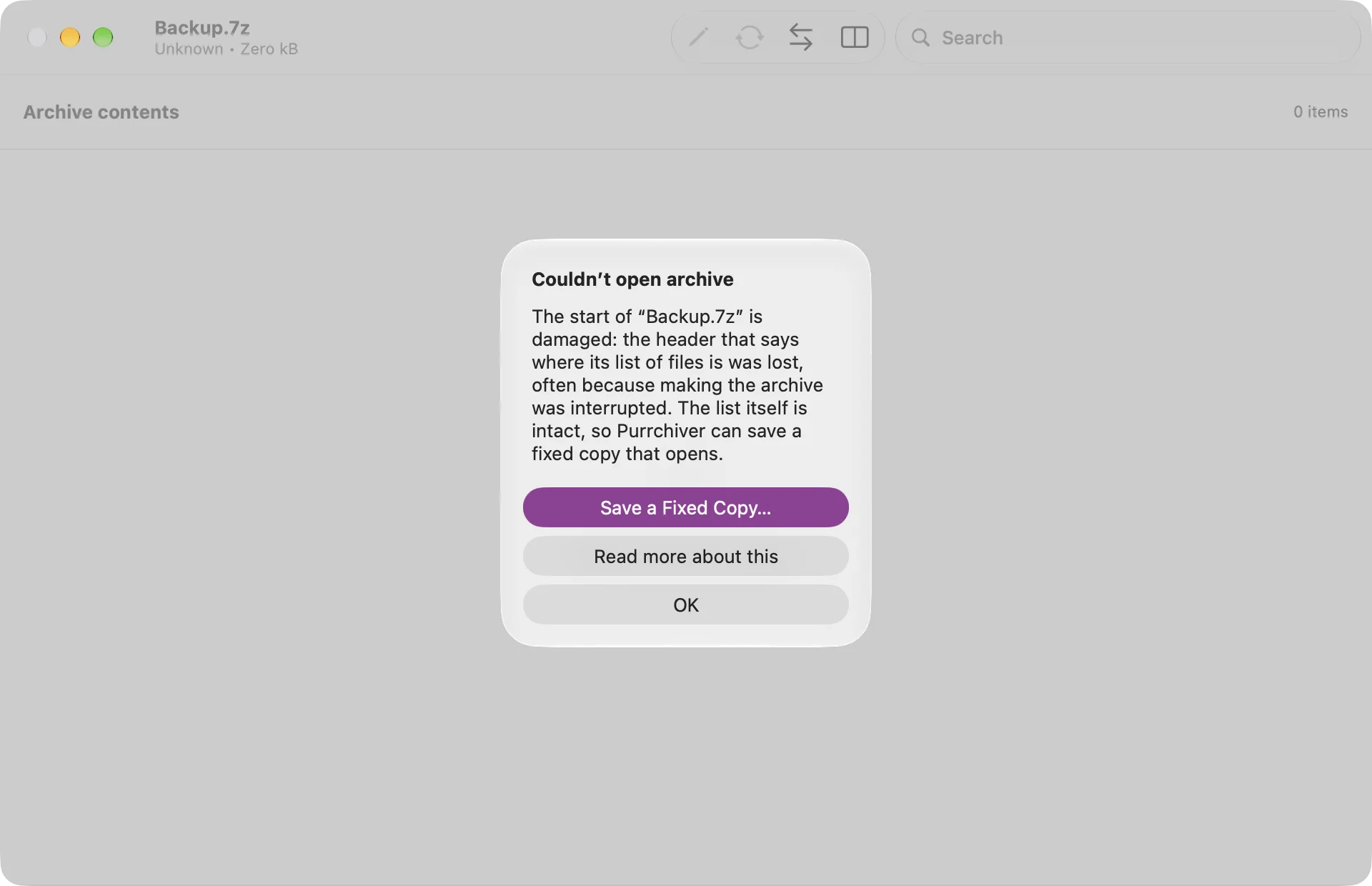
- Nothing inside is damaged, but it still won’t open. A 7z whose making was interrupted, or a ZIP over 4 GB made by Finder’s Compress, which leaves out records other apps need. These get a fixed copy — see below.
What can be recovered
| Damage | What comes back |
|---|---|
| ZIP cut off part-way | Every file before the cut, intact; the file it cut through, as an incomplete file |
| ZIP with a damaged index | Everything whose data is intact — often all of it |
| ZIP with a damaged file inside | Every other file, intact; the damaged one flagged |
.tar.gz, .tar.xz, .tar cut off part-way | Every file before the cut; the cut file minus at most its last ~64 KB |
| Multi-part set with a part missing | Every file stored wholly in the parts that are there |
| Archive on a drive with unreadable spots | Everything that doesn’t touch an unreadable spot |
ZIP stores a checksum for every file, so a changed byte is caught, and a damaged file is never handed back looking like the real thing. After recovering from a ZIP, Save as Repaired ZIP… writes a new ZIP of every file that checked out, which other apps can open.
When nothing inside is damaged
Some archives won’t open even though every file in them is fine; the problem is in how the archive was written. For these, the error explains what’s wrong and offers Save a Fixed Copy… (also in the Tools menu), which writes a new archive that opens and leaves the original as it is:
- A 7z whose start was lost. 7-Zip writes the start of a 7z last, so an interrupted write can leave it blank while the list of files at the end is intact. Purrchiver rebuilds the start from that list.
- A ZIP over 4 GB from Finder’s Compress. Archive Utility leaves out the ZIP64 records a ZIP that size needs, so most other apps, and Windows, can’t open all of it. The fixed copy adds them, copying every file as it is.
What can’t
- A 7z that’s cut off or damaged at the end. 7z keeps its list of files at the very end; without it there’s no way to find where any file starts. (Damage at the start of a 7z is often fixable — see above.)
- The part of an archive that’s missing. If a download stopped at 60%, the last 40% was never on your Mac. No tool can recover data that isn’t there — be wary of anything that implies otherwise.
- An encrypted archive without its password. Recovery still needs it.
7-Zip’s errors: “Headers Error”, “Unexpected end of archive”, “Cannot open the file as archive”
These are the messages 7-Zip gives for a damaged 7z, and what they usually mean:
- “Cannot open the file as archive” (older versions: “Can not open”) or
“Unexpected end of archive” on a 7z: almost always a download that stopped early. A 7z keeps its list of
files at the very end, so without the end there’s nothing to find the files
with. Purrchiver says the same thing, plainly, instead of extracting
nothing. Get a fresh copy; if it came with a
.par2file, repair it (above). - “Data error” or “CRC failed” with the end intact: part of the data is damaged. Purrchiver offers Recover What’s Readable… for these. Many 7z archives are “solid” (their files compressed together as one stream), so damage can take out every file after it in the same block, not just one.
- “Headers Error”: the archive’s own bookkeeping is damaged. Try recovering; if nothing comes back, 7-Zip’s own recovery guide describes manual methods for experienced users.
Protect the next one
The best fix is the one you set up beforehand. When you create an archive in
Purrchiver, Add recovery data saves a .par2 file beside it (part of the
one-time unlock). Keep the two together, and a cut-off download or a failing
drive later becomes a repair instead of a loss. It’s standard PAR2, so the
person you send it to can use any PAR2 tool.
Why free
Some “repair” tools scan for free and then charge before you can save what they found. Purrchiver’s recovery is free and saves everything it finds, because recovering your own files is reading them — and reading is free in Purrchiver, always. It runs entirely on your Mac; nothing is uploaded.
Related
- Recovering files from a damaged archive — the full how-to
- Multi-part archives on macOS — when one part of a split archive is missing
- Recovery data (PAR2)
- Common errors