Free up disk space on a Mac you develop on
What to delete first on a developer Mac: Xcode, simulators, Docker and caches, what each costs you later, and what a memory card is good for.
Measure first, because developer Macs differ too much for anyone’s totals to predict yours. Then delete what you can get back: simulator runtimes you don’t use, Docker images and build cache, Xcode’s DerivedData and old iOS DeviceSupport. Language caches and Homebrew are worth a quick check, but they may hold very little.
I tested the commands in this guide on macOS 27.2 with Xcode 27.2, on a MacBook Pro with M2 Pro. The pages say which ones I didn’t run.
What to check, and what it costs later
This is the order I’d go in. Where I give sizes, they’re readings from one Mac in November 2026, so treat them as a sense of scale. Yours will vary.
| What | How big | Measure yours | What it costs you later |
|---|---|---|---|
| Simulator runtimes | 3.7 to 7.9 GB each, across the three I measured | xcrun simctl runtime list -v | A re-download; simulators on that runtime stop working until then |
| Docker images and build cache | Varies too much to give a range | docker system df (read this first) | Re-pulling images, rebuilding local ones, slower first builds |
| iOS DeviceSupport | 5.5 and 5.7 GB in the two per-device folders I measured | du -sh "$HOME/Library/Developer/Xcode/iOS DeviceSupport/"* | Symbols copied again the next time you debug on a device (I haven’t timed this) |
| DerivedData | No reliable typical figure; it depends on your projects | du -sh "$HOME/Library/Developer/Xcode/DerivedData" | A full rebuild and re-index of each project |
| Language caches | About 2 MB to about 700 MB each | See the table | Re-downloads and slower next builds |
| Homebrew cleanup | Nothing to 590 KB in the previews I ran; it cleans up after itself | brew cleanup --dry-run | Very little |
Leave these alone unless you know why you’re removing them:
- Xcode archives. Apple says to keep the archive for every build you distribute.
- Docker volumes. They can hold real data.
~/Library/Cachesas a whole. Apple says macOS clears caches and logs that are safe to delete when space is needed.
The details and commands are on these pages:
- Xcode and simulators: DerivedData, DeviceSupport, archives, runtimes and old simulators.
- Caches, Docker and snapshots: Homebrew, Go, npm, pnpm, uv, pip, Docker on OrbStack, Time Machine snapshots and “purgeable” space.
- What to put on a memory card: which kinds of files suit a slower card and why, encrypted or not, and what symlinks do when the card is out.
Find what’s big
Start with what’s built in. System Settings > General > Storage shows space by category. Apple’s documented recommendations there are Store in iCloud, Optimize Storage and Empty Trash automatically. macOS 27.2 also lists a Developer row; I haven’t checked what its options remove.
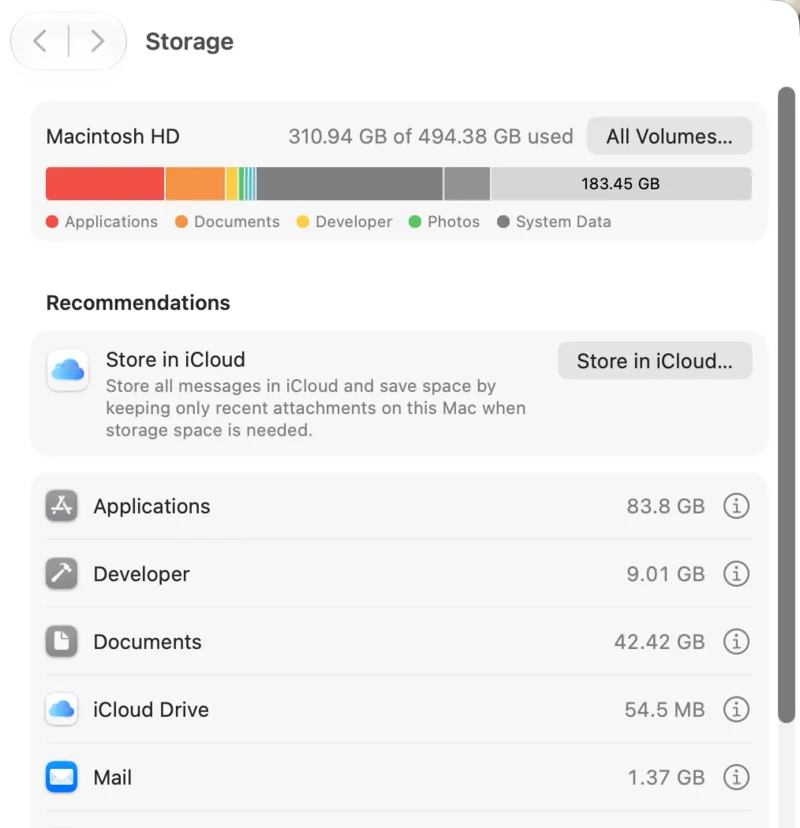
Then use Terminal. These only read:
df -h /System/Volumes/Data
du -xhd1 ~ 2>/dev/null | sort -rh | head -15
du -sh ~/Library/Developer/Xcode/* 2>/dev/null | sort -rh | head -10
du -sh /Library/Developer/CoreSimulator/* 2>/dev/null
xcrun simctl runtime listThe second line took about 35 seconds on my Mac. Three things can throw your numbers off:
ducan’t see everything. macOS blocks it from protected folders, and2>/dev/nullhides those errors. My first scan accounted for under a third of the space in use. Most of the rest turned out to be ordinary app and system data, not a hidden space hog.dureports a symlink as nothing. Add a trailing slash to measure what it points to. That’s safe withdu, but not withrm.dfanddiskutiluse different units.df -hreports binary units anddiskutildecimal ones, so 144 GiB is 154.6 GB. Apple also says the space snapshots use counts as available, so Finder’s number can differ again. I haven’t compared them.
If you want a picture, I used DaisyDisk, which its
site lists at $9.99 with a free trial. Its Scan as Administrator mode reached
folders my du scan couldn’t, and it accounted for most of the gap.
What I got wrong
- I assumed caches were the problem. The plan was to move them to a memory card. Once measured, they were small, so moving them was close to pointless.
- I blamed snapshots for the missing space. They held far less than I guessed.
- I expected freed space to show up right away. It didn’t, and that’s normal.
- My measuring changed things. Checking
orbanddockeronce started OrbStack and the containers set to start with it. Later,pnpm store pathmade Corepack download pnpm. - I kept encryption from the original plan without rechecking it. The plan had changed, and in my one test run on this card, the encrypted volume was slower, on files I didn’t need to protect.