Free up space from Xcode and simulators
Check simulator runtimes first: one you don’t use is a clean delete, because Xcode can download it again. Then look at iOS DeviceSupport and DerivedData. Keep archives of anything you shipped. I tested this on Xcode 27.2 and macOS 27.2.
Sizes vary a lot between Macs, so measure yours. Where I give a size, it’s from one Mac in November 2026.
| What | How big | Measure yours | Cost of deleting |
|---|---|---|---|
| Simulator runtimes | 3.7 to 7.9 GB each (three measured) | xcrun simctl runtime list -v | Re-download; simulators on them become unavailable |
| iOS DeviceSupport | 5.5 and 5.7 GB per folder (two measured) | du -sh "$HOME/Library/Developer/Xcode/iOS DeviceSupport/"* | Symbols copied again on next device debug |
| DerivedData | No typical figure I can source | du -sh "$HOME/Library/Developer/Xcode/DerivedData" | Full rebuild and re-index |
| Unavailable simulators | Small: all my simulators were under 500 MB | xcrun simctl list devices unavailable | Their contents |
| Archives | Depends on how many you keep | du -sh "$HOME/Library/Developer/Xcode/Archives" | Possibly your ability to read crash reports |
Simulator runtimes
Apple’s route is Xcode > Settings > Components. Apple says the pane shows installed components and how much storage you can recover, and that you click the information button next to a component, then Delete or Turn Off, depending on the component. On Xcode 27.2, the simulators are under Other Installed Platforms, and the information button opens a sheet with a Delete… button. I opened that sheet but didn’t delete anything from it.
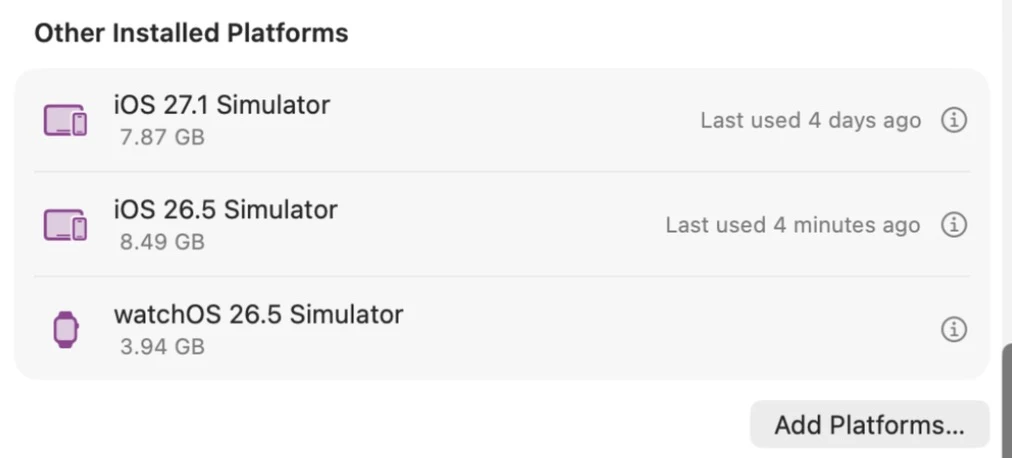
From Terminal, list them with their sizes and preview a delete. --dry-run only
prints:
xcrun simctl runtime list -v
xcrun simctl runtime delete --unusable --dry-run
xcrun simctl runtime delete --outdated --dry-run
xcrun simctl runtime delete --notUsedSinceDays 30 --dry-runAll three previews said “No matching images found to delete” on my Mac. If yours say the same, you’ll have to pick runtimes by hand.
This deletes a runtime, and any booted simulator on it is shut down. Copy the identifier from the list. I didn’t run this one:
xcrun simctl runtime delete PASTE-IDENTIFIER-HEREApple says you can get a runtime back from the same pane, with the Add Platforms button, which downloads it again. I haven’t tried that download. Simulators don’t vanish when their runtime goes: I have some left over from an iOS 27.0 runtime, listed as unavailable.
To see those leftovers, then remove them:
xcrun simctl list devices unavailable
xcrun simctl delete unavailableThe second line deletes those simulators and has no dry run. I didn’t run this one.
/Library/Developer/CoreSimulator/Caches can hold more: mine had 5.6 GB in a dyld
folder. simctl has a command to remove those caches, but I don’t know how long
they take to rebuild, so I’ve left them.
iOS DeviceSupport
I couldn’t find Apple documentation for this folder, so this part rests on forum replies, none from Apple staff. They say Xcode uses it to add symbol names to crash logs, that you can delete it, and that Xcode copies the symbols from the device the next time you connect it for debugging. So it comes from your device, not a download. An older folder may not come back once that device has moved to a newer OS, though that’s my reasoning and I haven’t tested it. Mine holds one folder per device and OS version.
I moved mine to a memory card rather than deleting it, so I haven’t seen the re-copy happen or timed it. To delete only the versions you no longer debug on, look first:
du -sh "$HOME/Library/Developer/Xcode/iOS DeviceSupport/"*Then remove a version folder in Finder, or with rm -rf and its full path. I
didn’t run that one.
If this folder is a symlink, be careful with the slash. I tested this on
files I made for the purpose. On macOS 27.2, rm -rf link/ with a trailing
slash deletes the folder the link points to and leaves the link behind. See
symlink risks.
DerivedData
This is Xcode’s build output. I couldn’t find an Apple page on deleting it, so this rests on other developers. A forum reply, not from Apple staff, says that removing a project’s folder here causes a re-index the next time you open the project and a full rebuild the next time you build. Close the project first. A Kodeco article from 2021 says everything in it is safe to delete, and that your next build takes longer.
The cost is your time, and how much depends on the project. I haven’t measured it. Quit Xcode first. This can’t be undone:
rm -rf "$HOME/Library/Developer/Xcode/DerivedData"I didn’t run this one on my real folder for this guide. I ran the same command on a copy of the folder layout in a test directory, and it removed only that folder, leaving its neighbors alone. To clear one project, delete its folder from inside DerivedData instead.
Because it’s build output, expect it to fill up again as you build. Treat this as a one-off gain.
Archives
Apple is clear about these: “You must retain the Xcode archive for each build of your app you distribute.”
Each one holds the dSYM files that put symbol names in crash reports, and a
rebuild may not replace them, because Apple says a dSYM only works with a binary
whose build ID matches. Archives of builds that never left your Mac are the only ones
I’d consider deleting.