Keep Apple Intelligence on your Mac
There is no single switch on macOS 27 that keeps all of Apple Intelligence on your Mac. Apple’s privacy pages don’t describe one, and I didn’t find one in the system’s own text. Instead, each feature has its own control. Here are the ones that matter, from Apple’s guide to turning off and restricting Apple Intelligence and the labels in macOS 27.2.
Feature by feature
- Shortcuts: in each Use Model action, pick On-Device. It works offline and has no usage limit; tested side by side with the cloud models.
- Summaries: turn off Summarize Messages (Messages > Settings), Summarize Message Previews (Mail > Settings > Viewing) and Summarize Notifications (System Settings > Notifications).
- Siri: Siri AI uses Private Cloud Compute. Use Siri Classic goes back to the older Siri, and Continue Without Personal Siri declines Siri’s access to your personal data. Separately, macOS says that “voice input is processed on Mac, but transcripts of your requests are sent to Apple.”
- Photos: Clean Up’s Fast edits work offline; High Quality and Extend need the network.
- Improve Siri & Apple Intelligence (System Settings > Privacy & Security > Analytics & Improvements): this is an opt-in. If you use Siri AI and turn it on, Apple says it may store your interactions with Siri and Dictation for up to two years. Leave it off if you don’t want that.
ChatGPT and other extensions
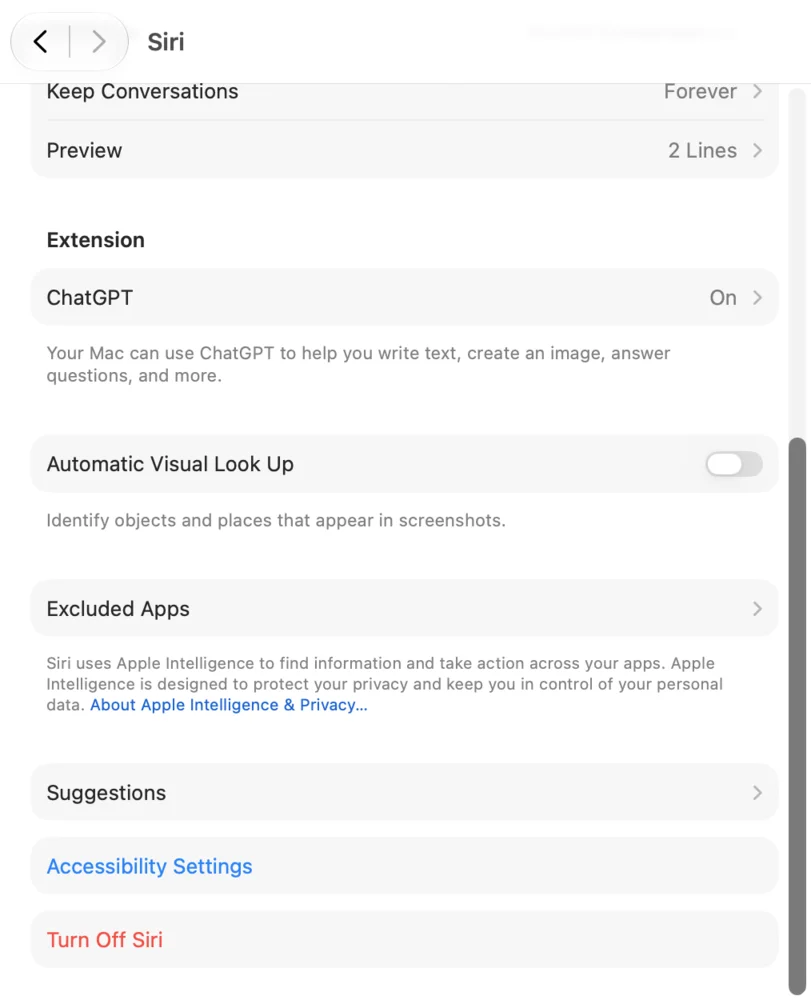
ChatGPT is off until you turn it on. When it’s on, Siri and other features can hand a request to it, and what happens next is OpenAI’s:
- Signed out, Apple says your IP address is hidden from OpenAI, and OpenAI mustn’t store your requests (except where the law requires it) or train on them. Your general location is still shared.
- Signed in, your ChatGPT account’s settings and OpenAI’s privacy policy apply.
The controls on macOS 27.2 are Use ChatGPT (or Use Extension with Siri AI), Confirm Requests, which asks before each request goes to ChatGPT (not offered with Siri AI), and Setup Prompts. On macOS 27.2 the ChatGPT controls are part of the Siri settings; Apple’s pages give slightly different paths, so look under Siri or Apple Intelligence & Siri for ChatGPT or Extensions. Turning off Use ChatGPT stops it.
Restrict it with Screen Time
Screen Time’s Siri restrictions can block features for a child, or for yourself, including Extensions, which macOS describes as allowing “extensions to provide additional text and image capabilities, including ChatGPT.”
Or turn it off
You can turn Apple Intelligence off entirely in System Settings; the features that depend on it stop working.