
Can an AI agent drive Moho?
Claude Code built and rendered a rigged, talking Moho cartoon by writing the project file. How it got in, what failed, and what it can't judge.
Yes, for making and rendering a simple cartoon. Claude Code built a rigged, talking character in Moho by writing the project file from Python and rendering it with Moho’s command line, without using the app’s interface for either. It can’t judge a voice or playback, and the file format isn’t documented as far as I can tell, so a Moho update could break all of this.
The full story is in I asked an agent to make a cartoon in Moho.
| Verdict | |
|---|---|
| Write a project file | Works, with a format that’s undocumented as far as I can tell |
| Render frames from the command line | Works: PNG, JPEG, TIFF, BMP, TGA and EXR |
| Render an animated GIF from the command line | Works |
| Render video from the command line | Works: -f plus -options, which I found by watching the app |
| Same result on a repeat render | Works in the frames I compared |
| Report failure through the exit code | Didn’t work: check for the output files |
| Check its own work | Works with limits: still frames only |
| Run unattended | Works over SSH with someone logged in at the Mac; logged out and scheduled not tried |
| Edit a generated project by hand | Works: the change saved and rendered from the command line |
| Moho’s bundled Lua scripts, from the menu | Works in the one I ran |
| Lua layer script set in the project file | Didn’t work in two attempts |
| Clicking through the interface | Works with limits: needs full-screen control, and Claude picked the wrong tools at first |
The way in
A .moho file is a zip holding a JSON project and a preview image. A Python
script of about 600 lines writes that project, with 14 bones, 22 art layers and
the keyframes, and copies its empty building blocks from a tutorial Moho ships.
Moho then renders the frames, and ffmpeg encodes them:
/Applications/Moho.app/Contents/MacOS/Moho \
-r wave.moho -f PNG -o frames/f -start 1 -end 120 -vI re-ran this for this page on one of the generated projects, for 3 frames. It exited cleanly in about a second, wrote three 1280x720 PNGs, and left no Moho process running. A full 175-frame render took 2.9 seconds on my Mac.
Other useful details from the same tests:
-f GIFwrote one animated GIF of 24 frames at 1280x720 from a 24-frame range.-halfsize yesrendered at 640x360.- Rendering the same three frames twice gave byte-identical PNGs.
- Splitting the render into two ranges and running them at the same time took 2.1 seconds. All 175 frames came out. In the second range, 25 frames weren’t byte-identical to the full render, and the same 25 differed when I ran the ranges one after the other, so running at once wasn’t the cause. In the frame I compared, no pixels differed at a 2% tolerance. A later check found this only with the split at frame 88. Splits at 89 and 101 gave byte-identical frames, so test your split point.
Moho can also write the video itself. -f takes the container and -options takes
the preset name:
/Applications/Moho.app/Contents/MacOS/Moho \
-r wave.moho -f mp4 -options "MP4 (MPEG4-AAC)" -o wave.mp4 -start 1 -end 24I found this by starting an export in Moho’s window and reading the command it launched. Each of these exited 0 on a 24-frame range and wrote a 1280x720 file. ffprobe reported 24 frames except where the table says otherwise. I sampled frames from the MPEG-4 and Motion JPEG files, and they showed the same poses as the PNGs. The MPEG-4 frames looked duller when ffmpeg decoded them, in the app’s export too, and I haven’t checked that in a player.
For -f, use the first word of the preset in lowercase, such as mov for
MOV (MJPEG-AAC).
-options | Video codec |
|---|---|
MP4 (MPEG4-AAC) | MPEG-4 |
MP4 (H.265-AAC) | HEVC, 23 of the 24 frames |
M4V (MPEG4-AAC) | MPEG-4 |
MOV (ProRes alpha-ALAC) | ProRes with alpha |
MOV (PNG alpha-PCM) | PNG with alpha |
MOV (MJPEG-AAC) | Motion JPEG |
MOV (MPEG4-AAC) | MPEG-4 |
AVI (MJPEG-PCM) | Motion JPEG |
AVI (PNG alpha-PCM) | PNG with alpha |
ASF (MJPEG-PCM) | Motion JPEG |
That table is Moho 14.4, and the preset names change between versions. MP4 (H.264-AAC)
crashed on 14.4, and MP4 (MPEG4-AAC) and MP4 (H.265-AAC) crashed on 14.5, which
adds an MP4/H.264 default.
On 14.5, MP4 (H.264-AAC) and M4V (H.264-AAC) wrote H.264 files of 24 frames. MOV (ProRes alpha-ALAC), MOV (MJPEG-AAC), MOV (MPEG4-AAC) and AVI (MJPEG-PCM) also worked.
A script that pins a preset name should expect to change it after a Moho update. My test
project has no audio, so I haven’t checked sound in these files. The app’s own command also passes -deletedocument yes on a temporary copy of the
project. Leave that out when you run this on your own file.
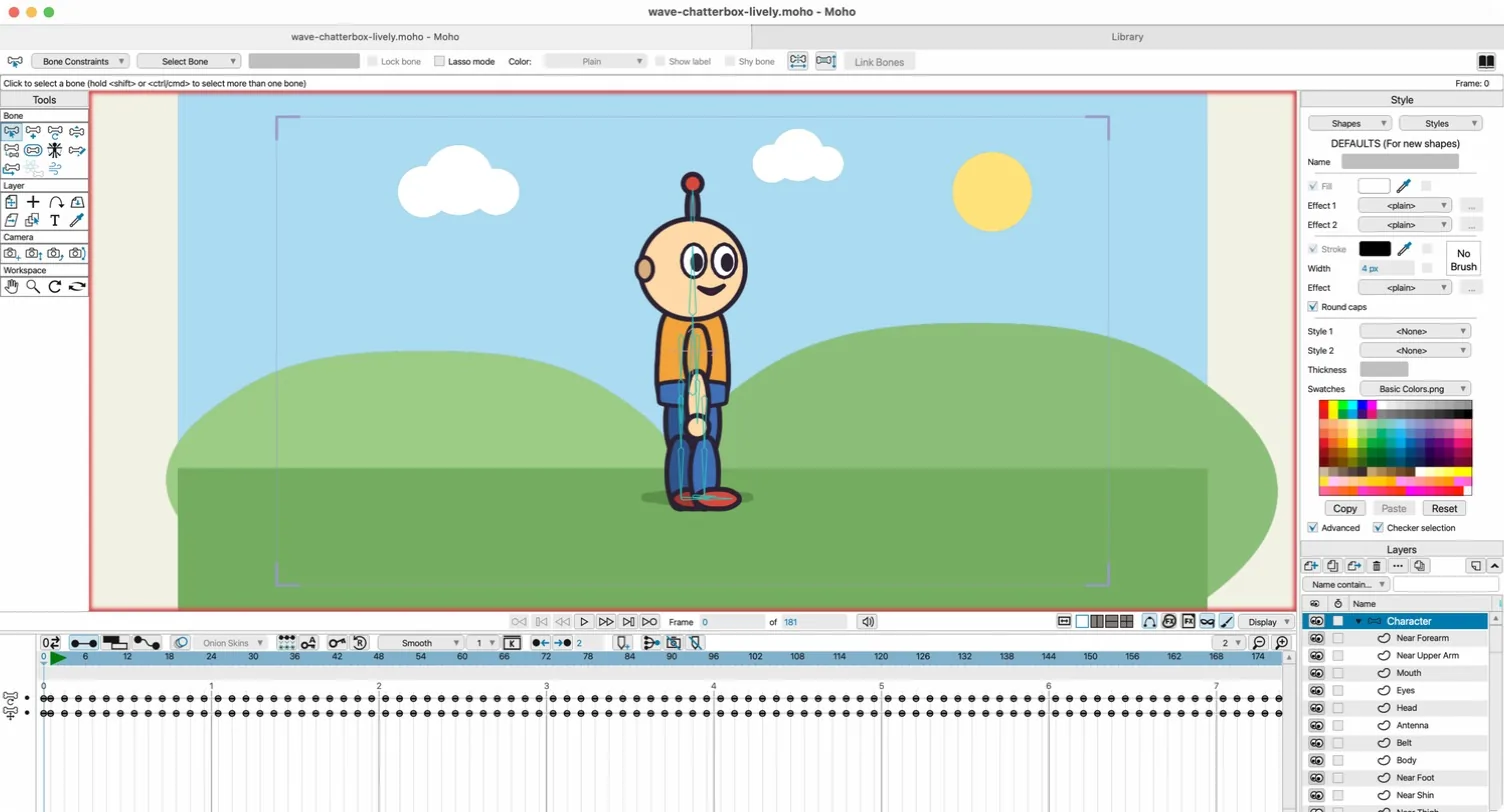
A generated project open in Moho 14.4.
What failed
- The first plan. Claude ranked Lua, Moho’s scripting language, first, and said it hadn’t tested any route. Testing changed the order, and the build never used Lua.
- Exit codes. A missing file, a junk file, a project Moho calls corrupt and a missing output folder each exited 0 and wrote no frames. A script has to count its output files, not trust the exit code.
- Asking for help.
Moho -hprinted nothing and was still running when I stopped it after 8 seconds. The options I used came from the post’s testing and from the names inside the app. - A number that made the file “corrupt”. A whole number in a field Moho
expects as a float rejects the entire file.
-1fails and-1.0loads. - Calling video broken. This was our mistake, not Moho’s. We passed format names
to
-falone, dozens of attempts across the rounds, includingMP4,H.264and the exact preset names, and each left a 0-byte file. This page first said video didn’t work. Video needs-fand-optionstogether, and the same install wrote all of the files above. - A wrong video name crashes Moho. A bad or missing preset exits 139 with no message
and leaves a 0-byte file named without its extension:
h264, noth264.mp4. The crash report points at the code that should print “Unable to create movie”, so the error handling itself appears to fail. - A Lua layer script. I set
layer_scripton one layer in a copy of the project, pointing at a script that writes a marker file. It didn’t run during a command-line render, or when I opened the file in Moho and changed frames. Two attempts don’t prove it can’t work, since the format is undocumented as far as I can tell. - Picking bone tools. Working from the toolbar’s icons, Claude first selected the Vitruvian tool, then the reparent tool, and changed the rig’s hierarchy by mistake. Undo fixed that. With the right tool, dragging the bone’s tip scaled it to 43%, when I’d expected a rotation. The status bar names the current tool, so read it before dragging.
- The background color. The project’s background doesn’t reach the PNGs, so the first render had a white sky. Claude drew a sky layer.
- Inspecting the app. Screenshots of Moho’s window failed within seconds of opening it, and Claude said it couldn’t inspect the rig. A later retry worked. Clicks on the canvas were refused while Moho was in the background.
Can a person pick up the file?
Yes, in my one test. In a copy of a generated project, a forearm bone was changed by hand at frame 30 using full-screen control. Moho added a keyframe and saved the file. The command line then rendered the saved project, and about 875 pixels differed from the original at that frame. That’s one bone in one project, not a full editing session.
Can Lua run?
Moho’s own scripts can. Scripts ▸ Script Writing ▸ Print Test ran and wrote to the Lua Console. I haven’t run a script of my own from the menu, because that means installing it into Moho’s scripts with Install Script.
Can it check its own work?
Partly. It looks at a grid of sampled frames, which caught a hand over the face and crossed legs. It can’t watch playback or vouch for the timing. It also can’t hear. Its stand-in was Whisper, which kept mishearing one line from one voice model, and neither of us has judged the lip sync closely.
Can it run unattended?
Partly. Rendering showed no prompts or windows that needed me, and it worked with
the environment stripped using env -i.
It also works over SSH. On a Mac mini running Moho 14.5 and macOS 27.2, a plain SSH session rendered 24 PNG frames, an animated GIF and the 14.5 video presets listed above, then left no Moho process running. A sampled PNG had no pixel differences from the same frame rendered on 14.4 on my laptop. A junk project still exited 0 there, so keep counting output files.
Someone was logged in at the mini’s console during all of this. I haven’t tried it with nobody logged in, or on a schedule.
Security
- Reach: the agent runs Moho and ffmpeg as your user, so they can reach your files, apart from whatever macOS privacy prompts block. Moho’s signature shows no App Sandbox entitlement on the copy I checked.
- Grants: the file and command-line route needed no screen-control permission. The screenshots and clicks above did go through screen control.
- Network: Moho opened TCP connections during command-line renders, to
20.237.110.18on port 80 in my samples. That address is registered to Microsoft and isn’t whatlostmarble.comresolves to. The app contains a version-check URL and an analytics setting, but I didn’t inspect the traffic, so I don’t know what these connections carry or whether a render works offline. - Input: the project file is generated locally. I haven’t tested opening
.mohofiles from anyone else. - Dependencies: the voice step installed a spaCy model by itself on first run, and our requirements file didn’t list it or pin versions. Fix both before relying on this.
Not tried
- A Lua script of my own from Moho’s menu
- Sound in directly exported video
- Running logged out or on a schedule
- Rigs drawn by a person and animated by the agent
- Building a project for 14.5 from its own files. The 14.5 tests rendered a project generated for 14.4
Tested on
Moho 14.4 on an M2 Pro MacBook Pro with 16 GB, macOS 27.2, with Claude Code, November 2 to 4, 2026. The render, video, format, exit-code, network, hand-edit and Lua tests above were run on November 4. The SSH tests ran that day on a Mac mini with Moho 14.5 and macOS 27.2. The script isn’t published.