
Can an AI agent drive Pixelmator Pro?
Claude Code drove Pixelmator Pro with AppleScript, System Events, Shortcuts and a file edit. What worked, what failed and the permissions.
Mostly. Claude Code used Pixelmator Pro to build and export layered App Store screenshot documents, mainly through its AppleScript support. The dictionary has no slices, though, so exporting slices takes System Events driving the app’s window, and fixing a slice took an edit to the file. Its Shortcuts actions also run from the shell, and they report failure better.
The results are the free App Store screenshot templates.
| Verdict | |
|---|---|
| Layers and text through AppleScript | Works, with some rough edges |
| Plain export through AppleScript | Works |
| Slices through AppleScript | Didn’t work: export for web writes one image of the whole canvas |
| Export for Web with slices, through System Events | Works with limits: it takes the foreground |
| Shortcuts actions from the shell | Works in the two I ran, with one click per import |
| Report failure through the exit code | Shortcuts yes; AppleScript only sometimes |
Editing a .pxd file directly | Works with limits: undocumented as far as I can tell |
| Check its own work | Works with limits: sizes yes, taste no |
| Run unattended | Works with limits: AppleScript over SSH while logged in; slices blocked there; logged out not tried |
The way in
AppleScript. The app has a scripting dictionary, which you can read with
sdef "/Applications/Pixelmator Pro.app". This ran on a copy of a template for
this page and wrote a 25920x1800 PNG. Copy your template to that path first. The
script closes without saving, so don’t point it at a document you have open:
osascript <<'EOF'
tell application "Pixelmator Pro"
  set d to open POSIX file "/tmp/template.pxd"
  delay 2
  export d to POSIX file "/tmp/full.png" as PNG
  close d saving no
end tell
EOFClicking in the app. Export for Web with slices took two kinds of clicking. For seven templates, System Events clicked File ▸ Export for Web…. Claude Code’s screen control then clicked Export…, the export button and Cancel by their position on screen. The Mac template used screen control for all of it. Across the eight templates this produced nine images each, at the exact sizes.
Those clicks didn’t need screen control. In a later test on one template, System Events did all the clicking and typing and wrote nine JPEGs at 2064x2752. It clicked the menu item, clicked the Export… button by name, pressed Command-Shift-G to type the folder, and pressed Return twice. This was three separate scripts, not one, and Claude took a screenshot of the window between them to see the save panel. System Events can’t see inside that panel, so a script would have to send the keystrokes blind, and they go to whatever is in front. Don’t run this while using the Mac.
Shortcuts. The app has 29 Shortcuts actions, such as Replace Text in Document and
Replace Layer in Document, and shortcuts run starts them from the shell. I ran this on a
copy with a text layer. The output had GOODBYE WORLD, and the input was unchanged:
shortcuts run "zz pxm replace2" --input-path hello.pxd --output-path replaced.pxdClaude generated that shortcut as a property list, signed it with
shortcuts sign --mode anyone, and opened it. Adding it took one click on Add Shortcut,
which Claude made through its screen-control tools. The action identifiers, such as com.pixelmatorteam.pixelmator.x.ReplaceTextInDocumentIntent,
were inferred from the action list inside the app, and this file format isn’t documented as
far as I can tell. The first version had no input surface, so it ran, exited 0 and did
nothing. The next version worked after several changes at once, including WFWorkflowTypes
and an output action, so I can’t say which one fixed it. An invert test took 20.5 seconds the first
time and under a second afterward, and worked when Pixelmator wasn’t already open.
The file. A .pxd is a zip holding a SQLite database, and the slices are
stored in there. The format isn’t documented as far as I can tell.
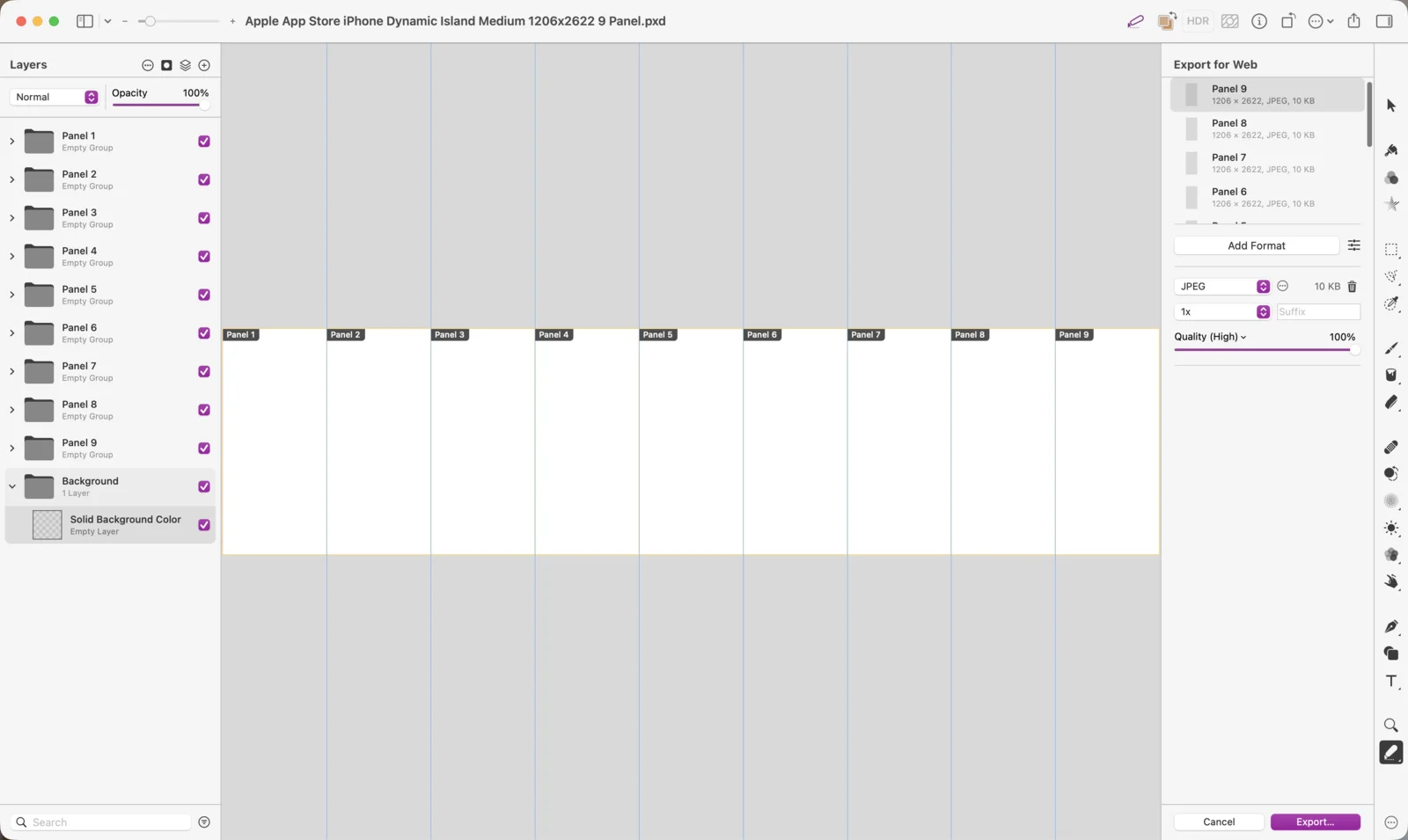
A template with Export for Web open, in Pixelmator Pro 3.8.
What failed
- Slices aren’t scriptable. The word “slice” doesn’t appear in the dictionary. One slice in my template was stored as 2880x1824 instead of 2880x1800. Claude closed the document, backed up the file, changed the value in the file, reopened it and confirmed the size in Export for Web.
- Calling the export button unreachable. This was our mistake. Finding the Export… button failed (-1719), so Claude switched to screen control. The later test found the button by its real name, with an ellipsis, in the window’s full list of controls.
export for webdoesn’t export slices. It ran without error and wrote one 18576x2752 image of the whole canvas.qualityisn’t an option here (-1700), butcompression factorandscaleare.- AppleScript failures can look like success. Opening a missing file returned
missing valueand exit 0. Opening a junk.pxdexited 0 with no document. Check the result before using it. Exporting to a missing folder did exit 1 (-100), but the script stopped before itsclose, so the document stayed open. - Deleting an empty image layer. The AppleScript delete did nothing. I then told Claude a document needs an image layer, so the templates keep one.
duplicatereturns nothing.set s1 to duplicate s0leavess1undefined (error -2753), so a script has to find the copy another way.- No path for an open document.
POSIX path of (file of d)fails (-1700). Pass the path in yourself. - Positions as text.
(position of layer) as stringruns the numbers together: 100 and 100 become100100. Read the items one at a time. - Shape fill. Setting
fill coloron a shape layer directly gave an error (-10006). Setting it through the layer’sstylesworked, in one test on a copy:set fill color of styles of x to {20000, 30000, 50000}changed the shapes’ color in the export. - Occasional errors.
savetimed out once (-1712), and one command that opened, exported and closed a document failed once with error -100, the same code a missing export folder gives. I don’t know the cause of either. - Blank panels. Export for Web exports empty panels as blank images, which is easy to mistake for a finished set.
Can it check its own work?
Partly. It exports, then measures the files with ImageMagick, so it can prove each image has the right size. It can look at an exported image and spot something misplaced. It can’t tell you the design is any good.
Repeat exports of the same document had no differing pixels, but the files weren’t always byte-identical, so compare pixels and not checksums. Through Shortcuts, a junk image and a missing file each exited 1 with an error message and wrote no output.
Can it run unattended?
Partly. AppleScript and shortcuts run both showed no prompts during these tests, and
both worked with the environment stripped using env -i.
AppleScript also works over SSH. On a Mac mini with Pixelmator Pro 3.8 and macOS 27.2, a plain
SSH session opened a template and ran export and export for web, taking about 4 seconds
with the app starting cold. The very first attempt, on a fresh install, hung until I stopped
it after 60 seconds and wrote nothing. Every later attempt worked, and I don’t know why that
one hung, so put a timeout around it.
Slices are the catch. System Events refused over SSH (osascript is not allowed assistive access, -1728), so that route won’t run there without an Accessibility grant, which I didn’t
give it. I also didn’t try Shortcuts on the mini, because adding a shortcut takes a click at
the screen.
Someone was logged in at the mini’s console during all of this. I haven’t tried it with nobody logged in, or on a schedule. The System Events route needs the app in front, so I wouldn’t schedule that one on a Mac someone is using.
Security
- Automation permission: macOS asks before one app can script another, so
whatever runs
osascriptneeds that grant. - Accessibility permission: System Events clicks need this. It’s the bigger grant, because it applies to controlling other apps, not just this one.
- Screen control: the original export buttons were clicked through Claude Code’s screen control, which needs its own approval and takes the screen while it runs. In the later tests, Claude still used those tools to look at the save panel and to click Add Shortcut, without taking over the screen. Running a shortcut once added didn’t need them.
- Keystrokes: the System Events route types into whatever is in front. A focus change could send a path and a Return to another app.
- Shortcuts: a shortcut you add can run from the shell afterward. Read what it does
before you add it.
shortcuts sign --mode anyonemay contact Apple. I didn’t inspect it. - The app: my Mac App Store copy is sandboxed. Its entitlements include network
client, read and write access to Pictures, the Photos library, the camera, USB
and iCloud. The sandbox didn’t stop a scripted export to
~/Library/Caches, so don’t count on it to limit where a script can write. - Input: I haven’t tested opening
.pxdfiles from anyone else. - Your files: a direct
.pxdedit can damage a document. Close it first and work on a copy or keep a backup.
Not tried
- The other 27 Shortcuts actions, such as Optimize Image for Web and Replace Layer in Document
- The System Events slice export on the other seven templates
- Shortcuts or slices over SSH
- Running any of this logged out or on a schedule
Tested on
Pixelmator Pro 3.8 with Claude Code, October and November 2026: macOS 27.0.1 for
the earliest work on October 25, including the slice edit, then macOS 27.2. The
export, text layer, duplicate, path and position checks were re-run on macOS 27.2
on November 4, 2026, and the System Events, export for web, Shortcuts and failure tests
were run that day, with the SSH tests on a Mac mini. The other results are from those
earlier sessions.