Write a file next to the one the person picked in the App Sandbox
A sandboxed app can read or write one specific file beside a picked file, with
no prompt, if it’s a related item: declare the type with
NSIsRelatedItemType, access it through NSFileCoordinator with a file
presenter naming the picked file as its primary item, and hold your access to
that file while you do. For writing, keep the picked file’s name and change
only the extension: photos.sha256 beside photos.zip worked in Purrchiver on
macOS 27, and photos.zip.sha256 was refused in a one-off measurement. Reading
the long name worked in Purrchiver’s UI test.
Purrchiver uses this for checksum and recovery files, since 1.1.
Checksum files in the App Sandbox tells that story, including what the shorter name costs.
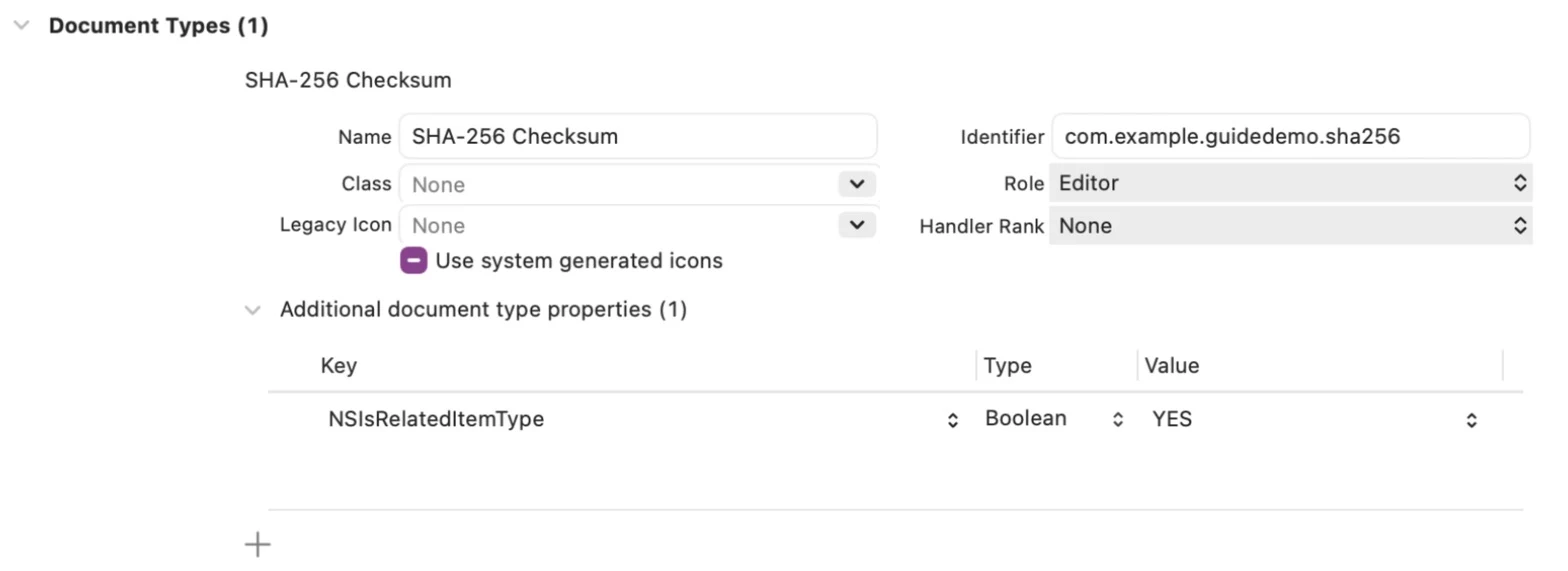
Declare the type
Add a document type for the companion file to your Info.plist. This is
Purrchiver’s entry, shortened to one extension (plutil -lint passes). The
App Store build has the same keys:
<dict>
    <key>CFBundleTypeName</key>      <string>Checksum File</string>
    <key>CFBundleTypeRole</key>      <string>Editor</string>
    <key>LSHandlerRank</key>         <string>None</string>
    <key>CFBundleTypeExtensions</key>
    <array><string>sha256</string></array>
    <key>NSIsRelatedItemType</key>   <true/>
</dict>NSIsRelatedItemTypeis the one Apple’s steps call for.- Role Editor is what worked. With role None, the sandbox refused the write in a one-off measurement in this app, recorded only in a code comment. Apple’s example also uses Editor, though its steps don’t say it’s required.
- Rank None is my choice, not a requirement; Apple’s example uses Default.
It’s meant to keep Purrchiver out of Finder’s Open With menu for
.sha256files. The app needs to write them, not be their app. - Extensions or a UTI. Apple’s example names a UTI with
LSItemContentTypes. Purrchiver lists extensions, and I haven’t tried the UTI form.
Access it through a file presenter
The presenter says “this file goes with that one”. Register it, coordinate, and unregister when you’re done, as Apple describes. You must already have access to the primary file, so wrap this in a start and stop if you’ve stopped it.
final class RelatedItemPresenter: NSObject, NSFilePresenter, @unchecked Sendable {
    let presentedItemURL: URL?
    let primaryPresentedItemURL: URL?
    let presentedItemOperationQueue = OperationQueue()
    init(item: URL, primary: URL) {
        presentedItemURL = item
        primaryPresentedItemURL = primary
    }
}

func writeRelated(_ data: Data, to sidecar: URL, beside primary: URL) throws {
    let presenter = RelatedItemPresenter(item: sidecar, primary: primary)
    NSFileCoordinator.addFilePresenter(presenter)
    defer { NSFileCoordinator.removeFilePresenter(presenter) }

    var coordinationError: NSError?
    var writeError: Error?
    NSFileCoordinator(filePresenter: presenter).coordinate(
        writingItemAt: sidecar, options: .forReplacing, error: &coordinationError
    ) { url in
        do { try data.write(to: url, options: .atomic) } catch { writeError = error }
    }
    if let error = coordinationError ?? writeError { throw error }
}(Type-checked with swiftc -typecheck, Xcode 27.2. I couldn’t run it
sandboxed for this guide; it’s a shorter version of the shape Purrchiver uses,
and that’s what its UI tests exercise.)
Write inside the block, to the URL it gives you. Check both errors. If coordination fails the block never runs (Apple), and I don’t know which of the two a sandbox refusal produces. Coordination blocks, so call it off the main thread, and don’t nest coordination inside the block.
The naming limit
Apple doesn’t state an exact rule. Its documentation describes a subtitle file with the same name as its movie and a different extension, and calls that a convention. So this is what one app recorded on macOS 27, not a rule:
Beside photos.zip | Write | Read | Evidence |
|---|---|---|---|
photos.sha256 | Allowed | Not measured outside the container | UI test: created through a real Save panel outside the container |
photos.zip.sha256 | Refused | Allowed | Write: a one-off measurement with a probe, noted as seen in the system log; no saved output. Read: UI test through a real Open panel |
Three limits on that:
- No automated test asserts the refusal. The UI test proves the short name works. The refused name was measured by a probe, with an archive picked through a real Open panel. No saved output survives, and I didn’t repeat it for this guide.
- The read and write sides differ, and I don’t know why. The long name was refused for a write and read without trouble.
- Other shapes aren’t measured. For
backup.tar.gz, Purrchiver’s code producesbackup.tar.sha512or.sha256, and a unit test checks the first as a name only. I have no sandbox result for that, for a picked file with no extension, or for a sidecar in a different case.
To get the name, replace the last extension rather than adding one:
func relatedURL(for file: URL, extension ext: String) -> URL {
    file.deletingPathExtension().appendingPathExtension(ext)
}I compiled and ran this outside the sandbox on macOS 27.2. It’s only naming:
| Picked file | Result |
|---|---|
photos.zip | photos.sha256 |
a.tar.gz | a.tar.sha256 |
notes | notes.sha256 |
.hidden | .hidden.sha256 |
The cost: two files want one name
photos.zip and photos.7z in one folder now both want photos.sha256. My
first version replaced whatever was there with no warning, so extracting one
archive could check it against the other’s list. Recovery files had the same
bug. Purrchiver now checks whose file it is, refuses to replace another
archive’s, and says whose it is. Its checksum lists name their archive on the
first line so it can tell.
If you use related items, decide up front what happens when the name is taken.
Test outside your container
Your app has full access to its own container, so these limits never come into play there. A test fixture inside it proves nothing about a file in Downloads. That’s how my help pages came to say the long name could be read before anything had measured it: the test fixtures were all in the container.
A real test needs:
- A sandboxed build.
- A file outside the container, which a UI test runner can make in its own temp folder.
- The real Open or Save panel, not a launch argument that passes in a path.
Purrchiver’s tests do this for creating with the short name and reading the long one.