Reach the person's files from a sandboxed Mac app
Show a standard panel, and macOS adds what the person chose to your app’s
sandbox. The panel runs in another process, so your app doesn’t need access
to browse. Turn on User Selected File in the App Sandbox capability (Read
Only or Read/Write), which is the
com.apple.security.files.user-selected.read-write entitlement in Purrchiver’s
case. That’s most of it. The rest is what the grant doesn’t cover.
Apple’s description is in Accessing files from the macOS App Sandbox. What I add below comes from Purrchiver’s code, tests and commit history; I didn’t re-run these panel flows for this guide.
What each action grants
| What the person did | What your app gets | Source |
|---|---|---|
| Picked a file in an Open panel | That file | Apple, and Purrchiver’s UI tests |
| Named a file in a Save panel | That file, not its folder | Apple for the grant; a Purrchiver UI test caught the “not its folder” part |
| Picked a folder | The folder and what’s inside it, recursively | Apple |
| Dragged a file onto your Dock icon | That file | Apple |
| Dragged a file into a window | That file, not its folder | Purrchiver’s commit history; Apple’s page doesn’t cover drops on a view |
Apple notes that a file inside a granted folder can still be out of reach for other reasons, such as POSIX permissions.
Write a new file somewhere
Don’t build the output path yourself. Ask, and use the URL you get back:
@MainActor
func chooseOutput(named name: String, startingIn folder: URL) -> URL? {
    let panel = NSSavePanel()
    panel.directoryURL = folder
    panel.nameFieldStringValue = name
    return panel.runModal() == .OK ? panel.url : nil
}(Type-checked with swiftc -typecheck, Xcode 27.2. I didn’t run it.)
Setting directoryURL is only a suggestion to the panel. It grants nothing
until the person confirms, which is how Purrchiver can still start a panel in
Downloads after dropping its “extract to Downloads” option.
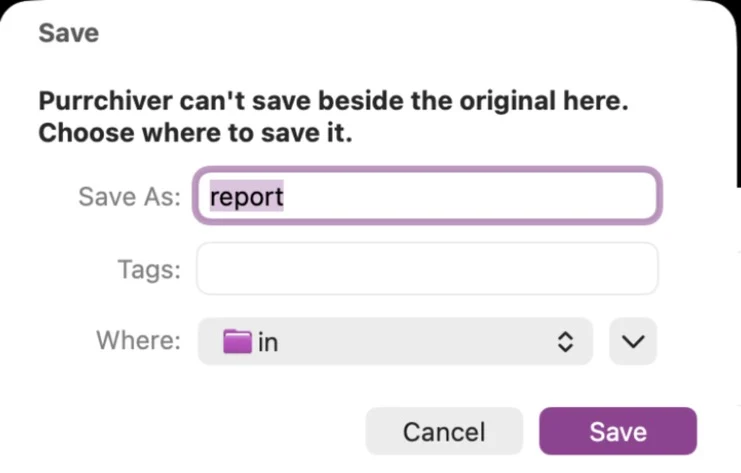
To avoid asking every time, try the write first and fall back. Purrchiver writes a small probe file to see whether the folder takes a write, and shows the panel only when it doesn’t. Its panel says why, “Purrchiver can’t save beside the original here”, since people reasonably wonder why an app needs to ask. A read-only volume takes the same path.
Files beside the pick
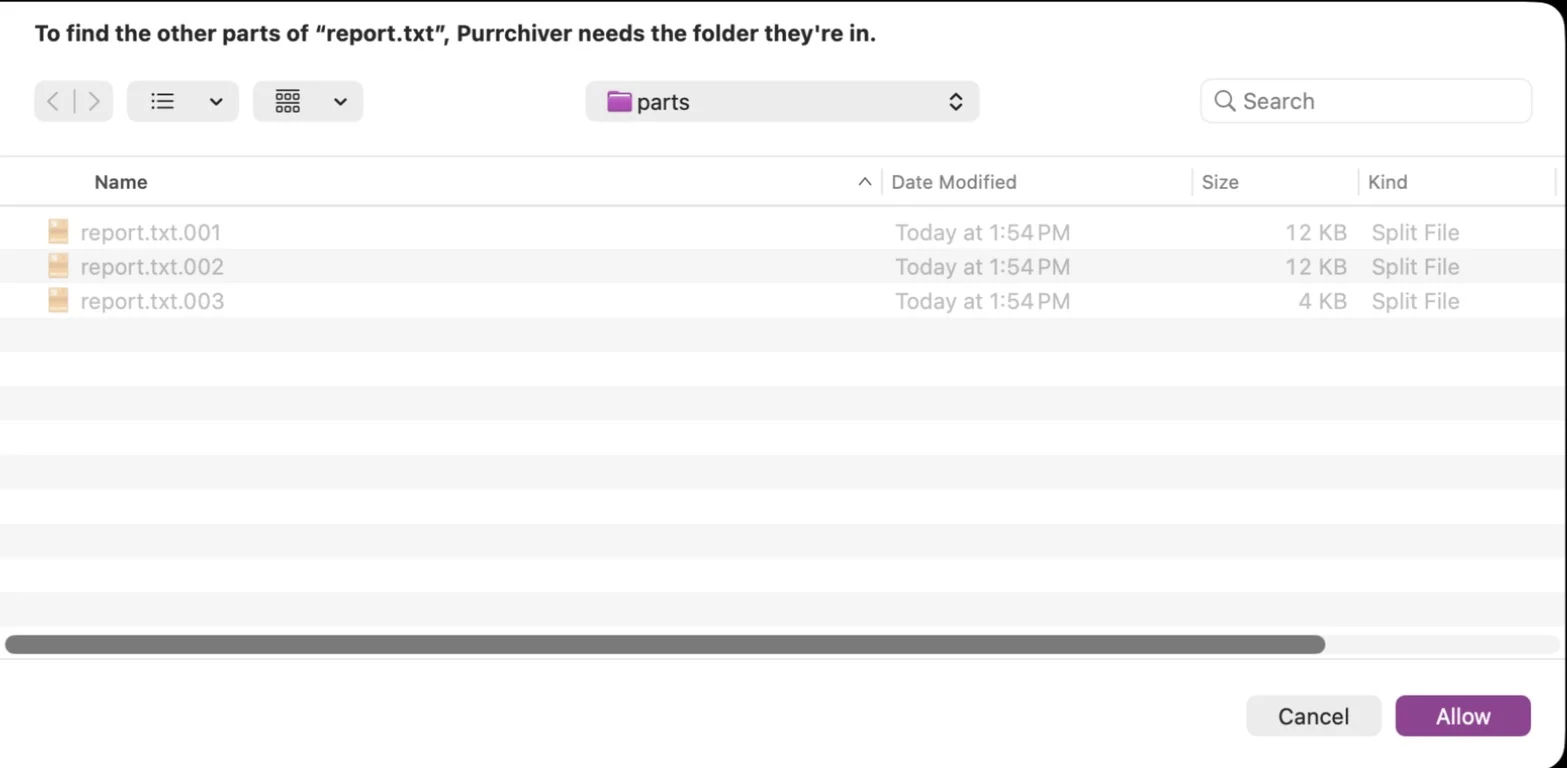
Some files only make sense with their neighbors: the parts of a split archive, say. Opening one part used to fail in Purrchiver with “Failed to open …7z.002”, because the second part wasn’t granted. There are two ways out.
- Ask for the folder, when the names vary or there are many files. Purrchiver first tells the person this looks like a split archive, then shows a folder picker. Its Join Parts panel gives the reason in the panel’s message.
- Use a related item, when there’s one companion file with a predictable name. It needs no second prompt. See the related items page.
Keep access across launches
A stored path doesn’t carry a grant. Purrchiver found this twice. Its default extract folder needs to survive a relaunch, so it’s stored as a bookmark. And macOS restores windows with their state but not their sandbox access, so restored windows failed to read their archives, and one-shot actions like an extract ran again and failed. Those windows now list the files and offer Choose Again. That decision has unit tests; the relaunch itself doesn’t have a UI test, because XCUITest’s terminate doesn’t reliably leave window state for macOS to restore.
Only create a bookmark if you need the access after a relaunch; Apple says so, too. Create it while you have access, and refresh it when it’s stale:
func saveFolder(_ folder: URL) throws -> Data {
    try folder.bookmarkData(options: .withSecurityScope,
                            includingResourceValuesForKeys: nil, relativeTo: nil)
}

func useFolder(_ bookmark: Data, _ body: (URL) throws -> Void) throws -> Data? {
    var stale = false
    let url = try URL(resolvingBookmarkData: bookmark, options: .withSecurityScope,
                      relativeTo: nil, bookmarkDataIsStale: &stale)
    guard url.startAccessingSecurityScopedResource() else {
        throw CocoaError(.fileReadNoPermission)
    }
    defer { url.stopAccessingSecurityScopedResource() }
    try body(url)
    return stale ? try saveFolder(url) : nil  // store this if it isn't nil
}(Type-checked, not run.)
Unlike a panel’s URL, a resolved bookmark gets no automatic access. Call start yourself. Also expect it to fail: Purrchiver treats a folder that’s gone, on a disconnected disk or in the Trash as “ask again, and say why”.
You may not need the bookmark entitlement. Purrchiver has no
com.apple.security.files.bookmarks.app-scope. A UI test picks a folder
outside the container through the real panel, relaunches, and finds an
archive’s files extracted there. An Apple engineer
explains why on the forums:
the user-selected entitlements are accepted for this too, and a helper
process that never shows panels is the case for the bookmark entitlement. That
test ran on a development build rather than the App Store one, though the
sandbox entitlements are the same.
When to stop access
Apple’s rules:
- If start returns true, call stop as soon as you’ve finished, once per start. The last stop removes the access immediately.
- URLs from Open and Save panels, or from your Dock icon, are already started, as if you’d called start. Call stop when you’re done to revoke them.
- If you don’t stop, you leak kernel resources. Leak enough and your app can’t add locations to its sandbox at all, from panels or bookmarks, until it relaunches.
A small wrapper makes the pairing hard to get wrong:
func withScope<T>(_ url: URL, _ body: () throws -> T) rethrows -> T {
    let started = url.startAccessingSecurityScopedResource()
    defer { if started { url.stopAccessingSecurityScopedResource() } }
    return try body()
}(Type-checked, not run.)
Two things to know about that wrapper. It balances only its own start, so by
Apple’s description a panel URL’s automatic access is still there afterward.
Purrchiver works this way for picked files, and releases the folders it holds
when a window’s session ends. I haven’t measured what the file case costs in a
long session. And don’t use the return value to decide whether you have a
grant outside the sandbox: in my own test, an unsandboxed program calling start
on an ordinary file URL got true on macOS 27.2. I have no sandboxed result.
Inside the sandbox, Apple documents false as failure, so treat that as one, as
useFolder above does.
If work continues asynchronously, hold the access until it’s finished. Purrchiver keeps a drop destination’s access for the whole async receive, or the write into a granted folder isn’t allowed. iCloud-backed folders were only checked by hand.
Dragging files out
Purrchiver’s drags out of an archive hit two problems, both from its commit history and code comments:
- Adding a file coordinator on the sending side deadlocked a drop inside the app. The receiver already coordinates the destination, so the write hung with no error and nothing landed. Purrchiver now writes directly.
- Opening a dragged file in place failed. It needs a sandbox extension
that wasn’t passed on, which logged
CreateSandboxExtensionData failedand gave an empty import. Letting the system copy the file works.
What went wrong
I had a one-tap “extract to Downloads” option. It needed a folder permission the app doesn’t have, so I removed it. An old saved setting now falls back to just opening the archive.
The commit that removed it also said a file’s parent folder was already inside the scope the open had granted. That’s wrong when one file was picked, and Decompress and Decrypt later failed in just that way. So write down what a grant covers from a test, not from what seems reasonable.
Related
- Write a file next to the one they picked
- Check entitlements and find a denial
- Files & Folders prompts, the same area from the person’s side of the screen