Check a Mac app's entitlements and find a sandbox denial
Two checks settle most sandbox questions. codesign shows what the built app
is really allowed to do. The com.apple.sandbox.reporting log subsystem shows
what the sandbox refused. I ran the commands here on macOS 27.2.
Check the signed app
codesign -d --entitlements - /Applications/Purrchiver.appRun it on the build you’re shipping, not your project settings. On the App Store build of Purrchiver 1.1, it lists four keys:
com.apple.application-identifier
com.apple.developer.team-identifier
com.apple.security.app-sandbox
com.apple.security.files.user-selected.read-writeMy .entitlements file has only the last two; signing added the others. For a
parsable version:
codesign -d --entitlements - --xml /Applications/Purrchiver.app | plutil -p -Check each embedded extension separately, since each has its own:
codesign -d --entitlements - --xml \
/Applications/Purrchiver.app/Contents/PlugIns/PurrchiverQuickLook.appex | plutil -p -That prints one key for Purrchiver’s extension, app-sandbox.
Why not trust the project? Because the entitlements come from the file and
the target’s build settings. Purrchiver sets ENABLE_APP_SANDBOX and
ENABLE_USER_SELECTED_FILES in build settings as well, and a Capabilities
toggle can add a key while the file stays clean. Test the signed binary, not
the source shows how to make this a test
that reads the signed app, so it can’t slip through. For the document types, read
the built Contents/Info.plist the same way, with plutil -p.
Find the denial
A denial doesn’t crash your app. Apple says the system doesn’t terminate an app for it, so what you see is a failed call, or a feature that quietly doesn’t work. So look for it. Apple’s page, Discovering and diagnosing App Sandbox violations, gives you these places.
In Xcode’s debug output. Some system libraries print a message when the sandbox stops them. It’s the quickest check, but not every denial appears.
In Console. Add these one at a time to the search field, save the search, press Start Streaming, then reproduce the problem:
type:error
subsystem:com.apple.sandbox.reporting
category:violationThe report names the process and the action, and includes a backtrace to find the thread and the code that caused it.
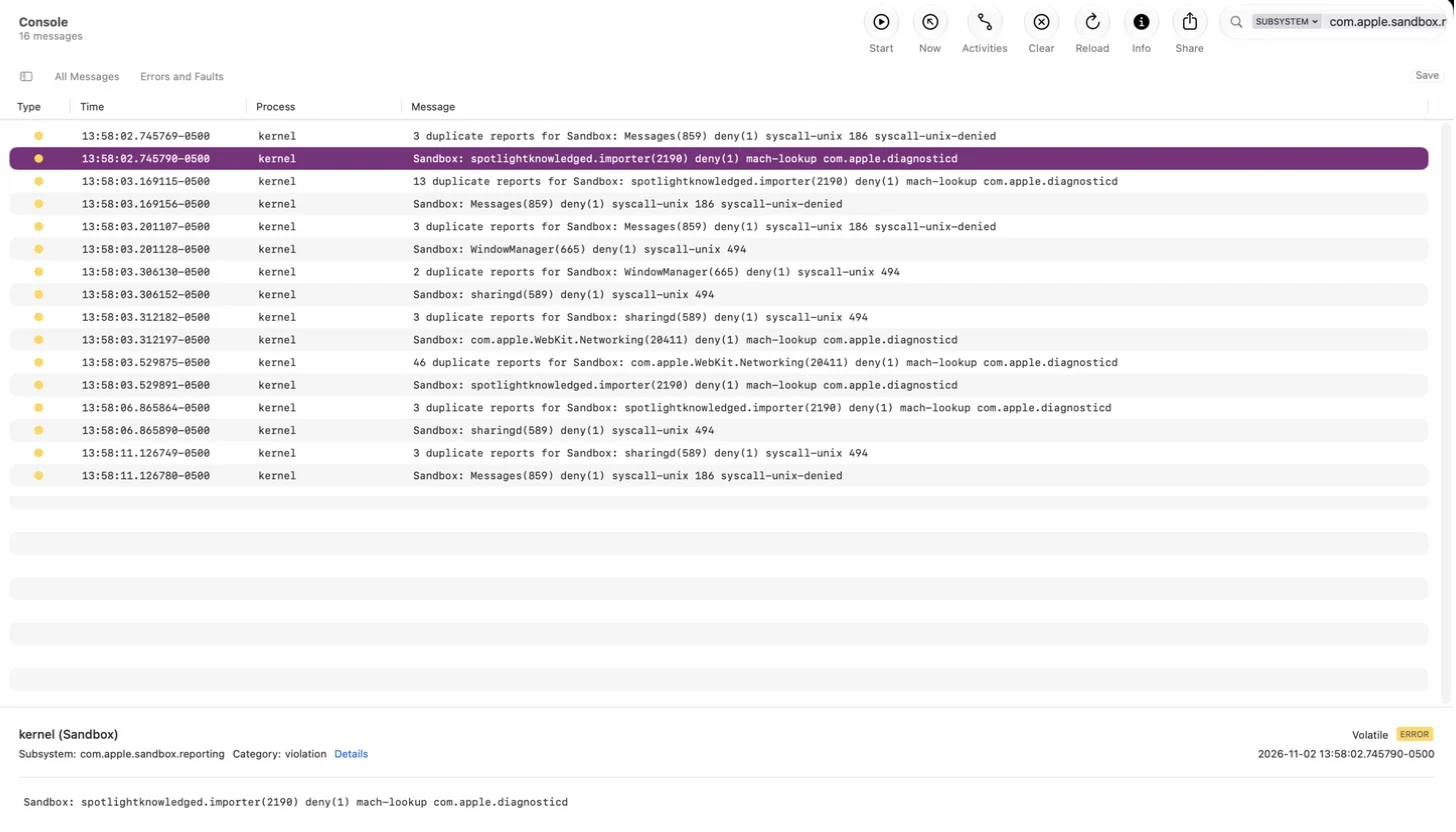
With log, which is what I use. Apple’s page doesn’t give a command. This
is one I tested:
/usr/bin/log show --last 1h --style compact --predicate \
'subsystem == "com.apple.sandbox.reporting" AND eventMessage CONTAINS "deny("'Add your app’s name to narrow it. Use the executable’s name. The bracket stops
Foo from matching FooHelper. The log cuts the name to its first 32
characters, so a longer name needs a shorter match without the bracket:
/usr/bin/log show --last 1h --style compact --predicate \
'subsystem == "com.apple.sandbox.reporting" AND eventMessage CONTAINS "Sandbox: YourApp(" AND eventMessage CONTAINS "deny("'I ran that with a system daemon’s name in place of YourApp, and got lines like
this one (timestamp trimmed):
kernel [com.apple.sandbox.reporting:violation] Sandbox: textunderstandingd(31125) deny(1) mach-lookup com.apple.dock.fullscreenThe form is the process, its ID, deny(1), the operation, and what it was
trying to reach.
A few things I learned running these:
- Spell out
/usr/bin/login zsh. Plainlogruns a zsh builtin, and my first try failed withtoo many arguments. - Filter on
deny(. The subsystem also carriesallowreports: in one hour on my Mac, 3,930 lines at default level and 3,145 errors. Filtering ondeny(left noallowlines. - Expect noise. System daemons log thousands of denials on a healthy Mac. Most mean nothing, so filter to your app and reproduce once.
- Repeats are collapsed, as lines like
5 duplicate reports for Sandbox: …. They match the predicate too. - Search soon after you reproduce. A request for seven days returned only two days of sandbox reports here.
- Use
log showor Console, notlog stream.log streamtakes the same predicate, but in most of my runs of up to 90 seconds it printed only its header whilelog showfound denials from the same minutes.
Read the operation
These are some of the operations in two hours of denials on my Mac, none from Purrchiver. The “usually means” column is my reading, not Apple’s definition.
| Operation | Usually means |
|---|---|
file-read-data, file-read-metadata, file-read-xattr | A path outside what you were granted |
file-issue-extension | Trying to pass on access to a path |
mach-lookup | Talking to a system service you aren’t allowed to reach |
network-bind | Binding a port |
user-preference-read, user-preference-write | Another domain’s preferences |
Apple’s own sample shows network-outbound, which fits an app with no
network.client entitlement.
A file denial points to the file access page. If the path is beside a file the person picked, that’s the usual “the grant isn’t the folder” case.
When it’s not the sandbox
EPERM doesn’t prove a sandbox denial. Apple lists other causes, with the error
each gives:
| Cause | Error |
|---|---|
| POSIX permissions | NSPOSIXErrorDomain 13 (EACCES) |
| An access control list | NSPOSIXErrorDomain 13 (EACCES) |
| System Integrity Protection | NSPOSIXErrorDomain 1 (EPERM) |
| Data protection | NSPOSIXErrorDomain 1 (EPERM) |
A privacy decision can look the same as well: an app denied the Desktop gets
“Operation not permitted”, as
my test on the permissions page
shows. No deny( line doesn’t prove it wasn’t the sandbox, since the log keeps
these reports only briefly and a long process name can miss the predicate. But if
you searched right after reproducing it and found nothing for your process, look
at those causes next, starting with
why a Mac keeps asking or never asks.
Don’t solve a denial by taking the sandbox off, even to see whether it helps. That build isn’t the one you ship. Read the log instead.
What I didn’t test
I ran these predicates against other programs’ denials. My Mac kept sandbox reports for only about two days, and Purrchiver last ran before that, so searching the log found nothing either way. So I can’t show you the exact line for a refused related item. The commit that measured it says only that the refusal showed up in the system log.